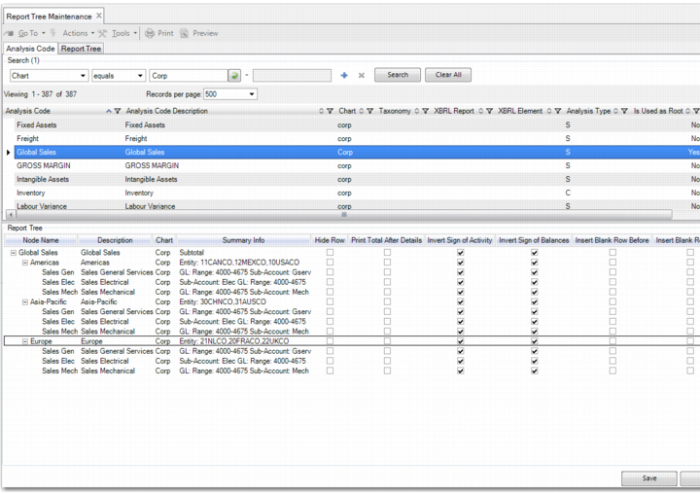
Report Tree Maintenance
The Financial Report Writer produces reports based on report trees. Each report tree is a hierarchy composed of report analysis codes. There are two ways to create a report tree.
• Create report analysis codes one by one using Report Analysis Code Maintenance. Next, create the report tree using Report Tree Maintenance. Report Tree Maintenance lets you select report analysis codes from a list and drag them to the tree hierarchy.
• Create a hierarchy in Excel, save it as a CSV file, and upload the CSV file using Financial Report Tree Import. This step creates the report analysis codes and the report tree.
This section describes how to create report trees using Report Tree Maintenance.
A report tree is a hierarchy built with report analysis codes. Usually, the higher levels in the tree are totals. You can use report analysis codes of type Sub-Total for this purpose.
Usually, the lowest levels in the tree, also referred to as leaves, are balances from accounting. You can use report analysis codes of type Analysis for this. However, Analysis type nodes can also be used higher in the tree. In this case, the whole branch in the tree under that code fulfills the selection linked to that Analysis code. In addition, Calculate and Text type codes can be anywhere in the hierarchy. See
Report Analysis Code.
Building a Tree
Report Tree Maintenance contains two browses in the header of the screen. The first browse contains the list of report analysis codes. The second browse contains the list of existing trees, identified by their top root-level node. You can drag and drop from both lists.
Create a New Tree
When you open the screen, the work area at the bottom is empty. If you drag and drop a single report analysis code into the empty work area, this report analysis code is at the top of the new report tree. The report analysis code at the top becomes the code that identifies the whole tree. You can continue building the tree by dragging and dropping more report analysis codes into the tree.
You can move nodes up and down in the tree, but only under the same parent node. If you want to move a node to another parent, right-click and delete the node. Next, drag the node from the browse at the top and drop it in the new location.
When you drop an existing tree on a branch of another tree that you are building, the whole tree that you dropped is copied into the target tree. There is no inheritance. Therefore, if you change elements of one of these two trees, the other tree is not changed.
Modify an Existing Tree
If you start by selecting an existing report tree from the Report Tree browse and dragging and dropping it in the empty work area, you are modifying an existing tree.