Synchronize Tables
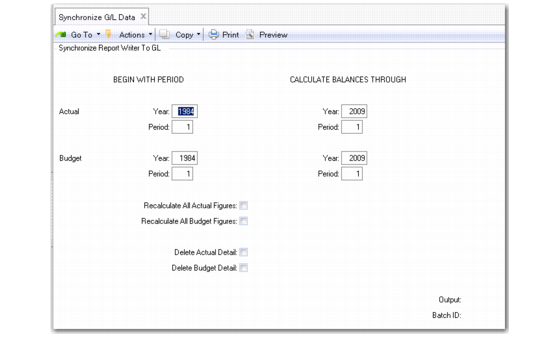
Use Synchronize G/L Data (25.17.21) to load financial data into the GL Report Writer tables. These tables are the source for reports you create.
You must run the synchronization to initialize the report writer tables. Then run it regularly to keep it up to date. The first time you run Synchronize G/L Data, the system creates new records and indexes in the report writer tables.
During a regular maintenance run, the synchronization recalculates account balances. If the balances have changed, the report writer tables are updated. If a new GL item has been added—such as a new account—the synchronization checks the analysis codes tables and updates them as needed.
To speed the daily run time of synchronization, you can perform a special run with dates specified to the end of the year. This special run sets up records and indexes for future periods so that daily synchronization can quickly update those records. Otherwise, the synchronization must create new records each time. You should perform this special synchronization at the beginning of the year.
Synchronize G/L Data (25.17.21)
1 For the initial synchronization run, enter the last period of the year in Actual Period and Balance Period.
2 Accept the default No for the Recalculate and Delete fields.
3 Enter the batch ID. You can use the same batch ID used for Transaction Post—but make sure Operational Transaction Post (25.13.7) runs before Synchronize G/L Data. Use Batch Request Detail Maintenance (36.14.3) to set the Priority field to zero or any number less than the priority of Operational Transaction Post.