GLRW Budgets
Creating GLRW Budget Data
Use GLRW Budget Maintenance (25.17.4.1) to create and maintain budget data used in GLRW reports. You can define GLRW budgets for account, sub-account, cost center, and project combinations.
Multiple GLRW budgets can be maintained for each entity, including different versions of a GLRW budget or different GLRW budgets for each year. Budget amounts are compared to actual amounts on comparative financial reports.
Note: You cannot report against GL units of measure entered for an account.
There are four ways to enter budgets:
• With fixed amounts for each GL period. If the normal balance for an account is a credit balance, enter the budget with negative values.
• With amounts calculated for each period based on a percentage of the balance of a specific account, sub-account, cost center, or project. Budgets maintained in this way must be recalculated after posting transactions, and before printing financial reports that include budget information.
• With amounts distributed evenly over calendar GL periods. To do this, set Auto Spread to Yes and By Percentage to No.
• With different percentages assigned to each GL period. To do this, set Auto Spread to Yes and By Percentage to Yes. An additional frame displays. You can enter the percentages for each GL period.
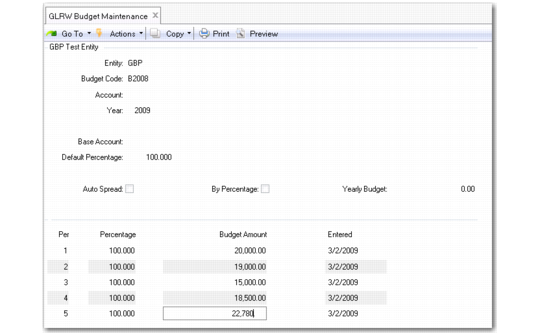
GLRW Budget Maintenance (25.17.4.1)
Entity
Specify the entity code to which this GLRW budget applies. You can maintain multiple GLRW budgets in GLRW Budget Maintenance for each entity code and year.
Budget Code
Specify a numeric budget code to identify a specific set of budget amounts for use in GLRW reports.
Account
Specify the GL account used to track budget amounts for this budget code and entity.
Year
Specify the GL calendar year for which the GLRW budget applies. The default is the current GL calendar year.
Multiple GLRW budgets can be maintained for each entity code and year.
Base Account
Specify the base GL account used to calculate budget amounts for this budget code and entity.
Default Percentage
Specify the budget percentage to use as the default in each GL period.
When GLRW budgets are based on actual results for a given base account, sub-account, cost center, or project, a budget percentage must be entered in each GL period. This percentage is used by the GLRW Budget Calculation process to calculate the GLRW budget amount.
You can enter budget percentages manually for each period or the system can set them automatically.
Auto Spread
Select the field to spread the yearly GLRW budget over all GL periods.
Clear the field to enter the budget percentage or amount for each GL period manually.
By Percentage
Select the field if the budget amount for each GL period is calculated as a percentage of the yearly budget.
When the Auto Spread field is selected and the By Percentage field is cleared, the system calculates the GLRW budget amount for each period by dividing the yearly budget equally over all GL periods in the year. If By Percentage is selected, you are prompted to enter a percentage in each GL period. The system uses this percentage to calculate the budget amount for the GL period.
Yearly Budget
Enter the total budget amount for the account and GL calendar year.
Per
Enter the GL period for which the budget percentage or amount applies.
Percentage
Enter the percentage to calculate the budget amount for this GL period. The total sum of the percentages for all GL periods should equal 100.
Budget Amount
If you enter a percentage for the GL period, the system calculates the GLRW budget amount by dividing the yearly budget amount by the percentage. Leave this field blank if budgets are based on actual results.