Redundant Components or Omissions
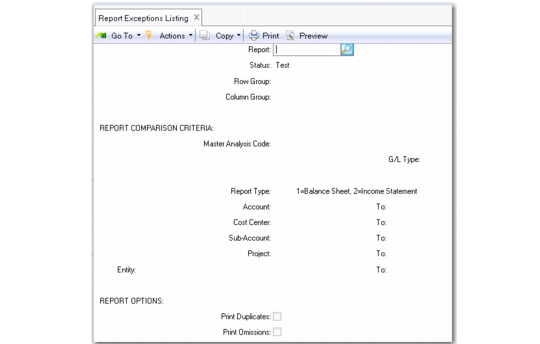
Use Report Exceptions Listing (25.17.13.7) to uncover redundant data retrieval and omitted GL items.
Report Exceptions Listing (25.17.13.7)
Redundancy Check
This option lists rows that contain the exact combination of GL items when exploded (account, cost center, sub-account, project, and entity). Enter Yes in Print Duplicates to perform a redundancy check.
Component Omissions Check
Use this check to find GL items that have been omitted from a report definition. Perform this check in one of three ways: using a master analysis code, a report type, or a range of GL items (only one option at a time). Enter Yes in Print Omissions to perform an omissions check.
When Yes is entered in Print Omissions, the Exceptions Report highlights any GL items with posted activity that are missing from the specified report definition in accordance with the selection criteria entered.
Master Analysis Code
Enter a master analysis code previously defined in Analysis Code Maintenance. The listing indicates GL items found in the master code but not found on the report definition.
Report Type
Balance sheets and income statements are checked using this option. Enter 1 or 2 in the Report Type field. The verification process uses the GL account type, as defined in GL Account Create.
GL Items
Enter a GL item range and run the listing. The result is a list of GL items not in the report definition.