Automatic Reversal
Reversing Journal Create (25.13.1.14) lets you create a journal entry that reverses automatically in the next GL period; you do not have to manually reverse the transaction. You also have the option to use correction of accounting for the reversing journal entry.
When you create a posting in Reversing Journal Create (25.13.1.14), both the original and reversing journal entries are created.
Reversing Journal Create
Reversing Journal Create is based on Journal Entry Create and contains many of the same fields. However, the following two fields are exclusive to reversing journal entries:
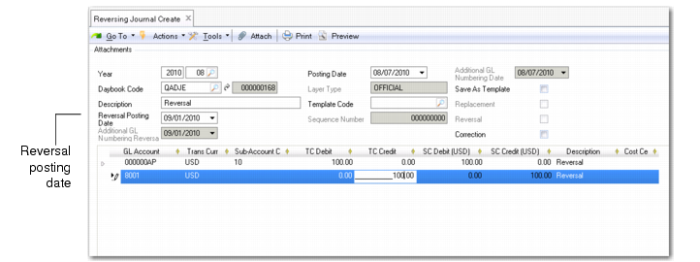
Reversal Posting Date
The reversal posting date defaults to the first day of the GL period following the original journal entry posting date. However, you can change the default date, and specify a new date.
Note: The reversing posting must always be posted to a future period. The posting occurs even if the posting GL period is not yet open.
Correction
Select this field to reverse the journal entry as a correction. When you create a correction, the postings are netted out, and the balance becomes zero.
Example:
A company uses temporary workers during December 2008, and the cost estimate is $18,000. The actual invoice will not be received until January 2009. In order to correctly reflect the costs for 2008, the cost for temporary staff must be included in the year 2008 books.
The company creates an automatically reversing journal entry on December 31 for the estimated cost of $18,000. On January 1, the posting is automatically reversed.
The financial statements for 2008 now correctly reflect the cost of temporary staff.