Relationship with Core QAD Enterprise Applications
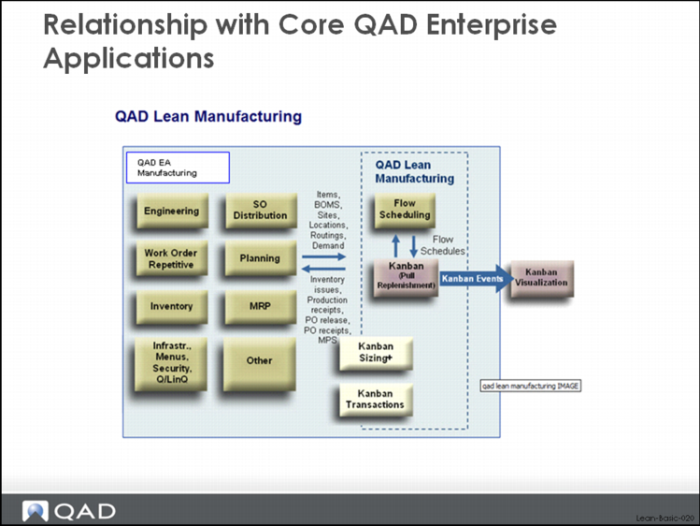
QAD Lean Manufacturing is part of an entire suite of enterprise applications (QAD Enterprise Applications) designed to help manage manufacturing and distribution organizations and their associated supply chains more effectively. The QAD Lean Manufacturing software was developed as an add-on module that compliments and connects to the core functionality of the base system. The image above is a diagram of the relationship between the lean manufacturing module and the core QAD Enterprise Applications (EA), specifically showing how pull systems and kanban as designed in QAD Lean fit into QAD EA.
On the left side of the image above you can see the core QAD Enterprise Applications functionality which includes sales orders, distribution, planning, work orders, inventory, bills of material and routings, etc. These all interact with QAD Lean Manufacturing (on the right), although generally speaking the data flow is from QAD EA to QAD Lean Manufacturing to QAD Kanban Visualization (part of Supply Visualization), and not back.
The QAD Lean Manufacturing functions read data from QAD EA to do basic calculations like loop sizing and leveling. The QAD Kanban visualization functions read kanban and kanban card data to produce electronic displays of kanban control boards and load assembly boards. The leveling calculations in QAD Lean can be configured to pass the leveled schedule back into EA to act as the master production schedule and drive material planning and supplier scheduling processes, and this is one major exception to the basic flow of data. The other major exception has to do with inventory record updating: kanban fill transactions can generate inventory receipts and backflush issues and these can be passed back to QAD EA.
This is the basic functionality provided in QAD Lean and QAD Kanban Visualization and which will be covered in detail in this course:
QAD Lean
• Value stream modeling (kanban controlled items, supermarkets, processes, kanban loops, control program defaults, process specific calendars, average demand calculations, safety stock calculations).
• Transactions and tracking (kanban card creation, management and printing; kanban status tracking (consume to fill cycle), kanban dispatch list, transaction history).
• Loop sizing.
• Leveling.
QAD Kanban Visualization (part of QAD Supply Visualization)
• Poller (basic connection to QAD Lean data)
• Transactions and tracking (kanban card management and printing; kanban status tracking (consume to fill cycle)).
• Visual control boards.
Relationship to QAD Enterprise Applications
The following data from QAD EA is required in order to operate QAD Lean:
• Item master data – basic definition of each item.
• Sites – basic definition of manufacturing and supply chain sites.
• Locations – basic definition of inventory locations.
• Suppliers – basic purchasing data associated with each supplier.
• Purchase orders – purchase order data for each item that can be purchased and received.
• Calendar – default calendar data.
The following data from QAD EA is optional and can be used in, and in many case improve, QAD Lean:
• Bills of material (used for backflushing inventory when kanban cards are filled, and in the calculation of average daily demand for components).
• Routings (standard run and setup times from the routing can be used for kanban loop sizing, tracking kanban cards through subcontract operations).
• Inventory transaction history (inventory usage data can be used in calculating average daily demand as well as demand variability for safety stock calculations).
• Forecasts, customer orders, customer schedules (can be used in calculating average daily demand as well as demand variability for safety stock calculations, used in takt time calculations and leveling).
• Flow schedules (a type of master production schedule that can be used in QAD Lean as part of the leveling process).
In the next section of the class we’ll cover basic setup considerations for lean manufacturing and pull system data in QAD Lean.