Kanban Control (Transaction Event Control)
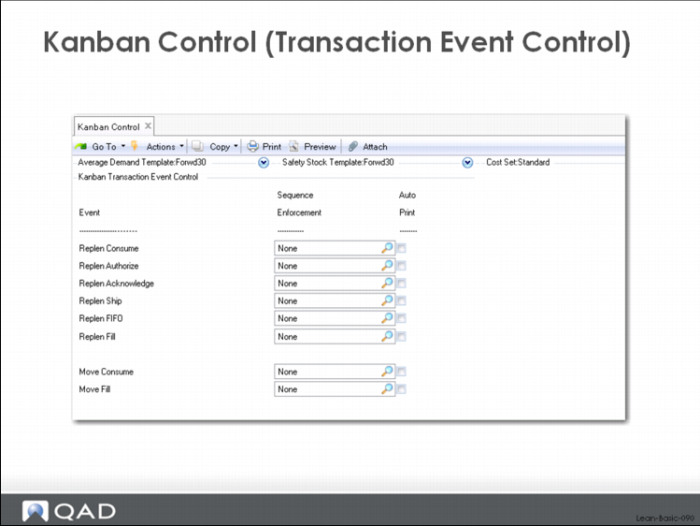
The settings in the Kanban Transaction Event Control Frame reflect decisions about which of the transactions (consume, authorize, acknowledge, ship/fill and fill) will enforced. The user has the choice of no enforcement (None), warn on error (Warning) or reject completely (Error). The auto print boxes allow the user to specify the point in the kanban loop where the cards are to be reprinted.
These are fairly typical values for getting started; for replenishment loops the system is enforcing the consume and fill transactions and nothing else. In other words, a user cannot report a kanban empty (consume) unless it is full. In the case of the fill transaction, the system will verify that the card is empty (consumed, authorized, acknowledged, ship, FIFO). It is not enforcing any sequence control on the authorize, acknowledge, ship or FIFO transactions.
Kanban Item Master Maintenance
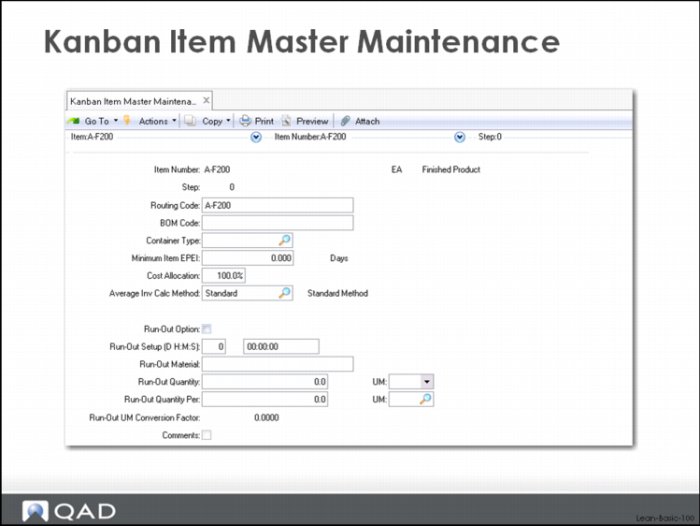
The Kanban Item Master Maintenance function of the system authorizes items for kanban control. The item must already exist in the Item Master of the core system (in QAD EA).
The only required data in the Kanban Item Master Maintenance screen is the item number and the step number. The item number is the part number that you use to identify something that you make or buy. The step number is a loop identifier that normally would be set to 0 (zero). Step number can have other values, and typically these would be set as a way to have multiple loops for the same item, either one feeding another, or where there are two sources for the item. In the case of having one loop feeding another, this might happen when there are two distinct processes each running at a different rate or with different setups and where the second (downstream) process is not treated as a FIFO lane. Here you might identify one loop as loop 1 and the other as loop 2.
The BOM and Routing Codes allow you to deviate from the normal bill of material and routing. Leave them blank and the system defaults to the standard BOM and standard routing as defined in QAD EA.
The Minimum Item EPE I is a kind of tool cycle based production interval and we will discuss it and its use when we review the Kanban Workbench.
Container type will be used in future material route and space calculations in the system. Cost allocation and Ave Inv Calc method control the Ave Inv calculations in the workbench. Run Out fields are reference only.
Supermarket Maintenance
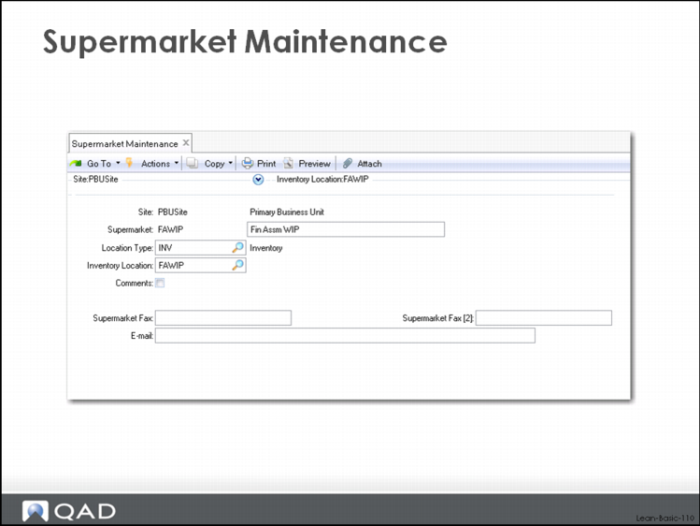
The Supermarket Maintenance function of the system establishes the controlled inventory points in the value stream, as well as the default inventory location associated with each supermarket.
In creating your value stream model you need to identify any supermarkets, which as we saw before are points in the value stream where you want to maintain a strictly limited and controlled amount of inventory, perhaps because you cannot achieve continuous flow from one process to the next.
The only required data in the Supermarket Maintenance screen is the site and the supermarket name. You can name your supermarkets anything you chose with the limits of the eight character name.
Supermarkets can be:
• Destination or source
• Inventory or work in process (WIP)
In most situations, a supermarket will be the destination for a manufacturing process or for inventory coming from a supplier, or for inventory coming from another supermarket as in the case of a transfer of material from a major warehouse to a factory point of use location. In this last situation, there would be a destination supermarket (the point of use) as well as a source supermarket (the major warehouse). This would be useful in situations where the inventory needs to be stored in two places because there's a physical distance between the two supermarkets or when you actually have material being pulled for several different source processes and it's a common component or a common sub-assembly that is used in multiple places.
You can identify supermarkets as being either inventory (INV) or work in process (WIP) supermarkets. You should identify a supermarket as an inventory supermarket (INV) if the material stored in the supermarket is part of the on-hand balance and is inventory reported as part of your financial statements. In other words if you want detailed inventory tracking across the entire value stream with an on-hand balance for each purchased part, fabrication, mix, blend, weldment, subassembly, etc., set your supermarkets to INV. With parameters set properly in the kanban loops, the system will maintain the on-hand inventory balances based on the kanban transactions. In other words, the kanban fill transaction will receive material into stock and backflush any stocked components to keep the inventory balances up to date.
You should identify a supermarket as work in process (WIP) anytime you choose not to track inventory balances for the item or items stored there. One way to use the system, for example, would be to identify every supermarket except for the one storing finished goods as a WIP supermarket. In this scenario, material could be received from the supplier (fill kanban against a specific purchase order) and the material would be transacted into stock and then immediately issued to WIP. Regardless of how many downstream loops it passed through in its value stream it would not be recorded as on-hand inventory. Only when it reached finished goods would it be received into stock.
Here’s one situation where you might want to code most of your supermarkets as INV with some selective WIP supermarkets. If you have a specific part that you produce where it is not possible to flow the part through all of the processes associated with its routing (operations 10 and 20 operate to a significantly different rate or with a very different setup time from operations 30 – 50), you can set up a supermarket between operations 20 and 30 to hold some semi-processed stock. This is not finished inventory; it has only been processed through operation 20 and consequently is work in process. Use the WIP supermarket to control it even though it is somewhat off the books.
Like most of the other maintenance displays in the system, the Supermarket Maintenance function provides a way to attach free form comments to the record being maintained. Check the Comments checkbox and the system will open a frame where you can enter any amount of text that you would like to associate with the supermarket.
The Supermarket Fax, Supermarket Fax [2] and Email fields allow you to record fax numbers and an email address that can be used for directing dispatching information.
Manufacturing Replenishment Sources: Process Maintenance
The next step in value stream modeling is to identify the distinct processes that make up the value stream. A process will be a cell, line, machine, work center, group of work centers that perform work and operate as a single synchronized unit. A process can do a single operation from the routing or a group of operations that are ideally done one after the other after the other without stop and with a one piece flow. In other words, if you run a batch in one cell and then pass the batch to the next cell for processing, then you should probably identify each cell as a separate process. However, if you move material synchronously from one machine or work center to the next one at a time, then it probably makes sense to have a single process that covers both machines/work centers.
Process Maintenance has two parts, one of which is mandatory, the other optional.
The required step in process maintenance is to identify essential process data. The optional step has to do with setting up the relationship between the process and the items produced there.
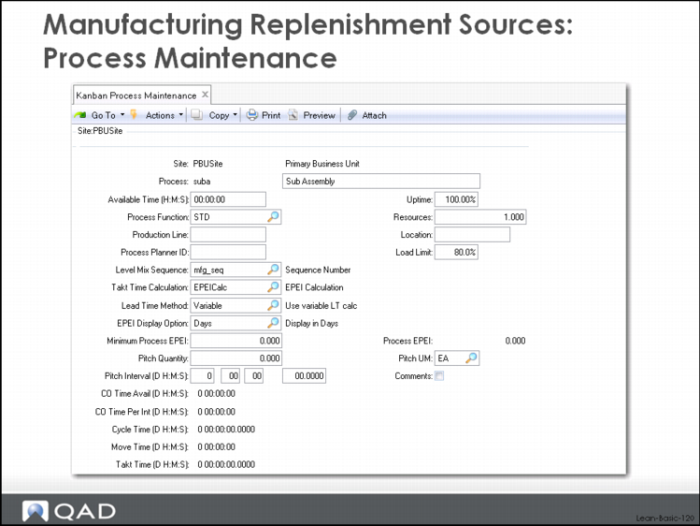
Basic process data is added and maintained in the screen: Kanban Process Maintenance.
To add a process the Kanban Process Maintenance screen requires a valid site and the process name.
These are the major fields used to describe a process (reading across and then down), and which are used to control key lean functions:
Available time (H:M:S)
This is the normal amount of time worked in an average day in this process. The system will calculate this for you, but you can load it directly and/or maintain it here. The Basic Process Calculations function of QAD Lean will calculate available time based on any calendar data you’ve entered, either for the site or for the process itself.
Uptime
The percentage of time that the process is actually up and running. Use with the available time to determine available hours in each day. Used in the loop sizing calculations.
Process function
This tells the system whether a process is a primary process (PACE or STD) or a FIFO process. A primary process is the first process in a kanban loop and it will receive the authorization signal when more of an item needs to be produced. If the primary process acts as a pacemaker for the entire value stream then it is identified through the function code PACE. Otherwise a primary process will be coded STD. A FIFO process is downstream of the primary process and is part of a FIFO lane. Work moves out of a primary process and is processed on a first-in, first-out basis in the subsequent processes until it reaches the supermarket (or the customer). FIFO processes receive work authorizations indirectly. Work appears and has to be worked on, or a transaction indicates that work has moved out of the primary process and in the FIFO lane itself.
Resources
Number of identical (interchangeable) resources in this process. Typically used to specify the number of identical machines in a cell.
Production Line
This field provides a way to map processes in QAD Lean to production lines in QAD Flow Scheduling. In order to use the leveled schedule created by QAD Lean in the Level Mix Workbench you must save it as a Flow Schedule and this data required to integrate these two functions.
Location
This field identifies the inventory location from which component parts should be backflushed. The components can be backflushed from some other location, based on settings you’ve made in the inventory location system and based on overrides specified on the kanban transaction that triggers the backflush.
Process Planner ID
This field identifies the individual responsible for this process.
Load Limit
The load limit is used in evaluating load against a process; if the load exceeds X% (the load limit) of the total available time, then the system generates an exception message.
Level Mix Sequence
This field indicates whether there is a particular sequencing requirement that should be considered by the leveling logic in the system. Currently there are three values: mfg_seq which can be used to handle product wheel kinds of sequencing, op_asc which specifies that the order of items in the leveled schedule is ascending by the number of operators needed to meet takt time, op_desc which specifies that the order of the items in the leveled schedule is descending by the number of operators needed to meet takt time.
Takt Time Calculation
This field references the calculation source for the takt time data for this process. Takt time in QAD Lean is typically calculated:
• In the Level Mix Workbench. The Level Mix Workbench does the primary leveling in the system.
• In the EPE Interval calculation in the Kanban Workbench. The Kanban Workbench is the primary function for loop sizing in the system.
• In the Basic Process Calculations of the system. This is a standalone function that calculates essential lean data.
Lead Time Method
This field has two values:
Variable: the system will calculate the replenishment time for the item based on the other parts and the run and setup standards. Initially it can be helpful to use this setting, and compare the result of the system’s calculation to the lead time you were planning to use on the item. It can also be helpful to use this setting in situations where you work less than 24 hours in a day, since the system can automatically convert time data using available hours per day to the elapsed lead time. More on this subject later.
Fixed: the system does not calculated lead times. The user specifies the replenishment time. The system will convert the fixed replenishment time, along with FIFO days and the fixed ordering interval, to the elapsed replenishment lead time in decimal days.
EPE Interval Display Option
The EPE Interval is the smallest possible production interval based on volumes, standard run times, setup times, and available hours. For a lean assembly cell, the EPE I might be 2 hours (0.083 days). For a much less lean fabrication or machining process, the EPE I might be 120 hours (5 days or 1 week). You can choose how you would like the EPE Interval to be expressed: in months, weeks, days, hours, minutes, seconds. The default value is days and this is what most companies prefer, although if the EPE I is substantially smaller or larger than a day, you might want to consider one of the other settings.
Minimum Process EPE I
The Minimum Process EPE I overrides the calculated EPE Interval in the loop sizing calculations in the system. For example, if the calculated EPE I is 0.083 days (about 2 hours) but you don’t want to run any item more frequently than daily, set the Minimum Process EPE I to 1. This will set the order quantity to the equivalent of a day’s usage, and size the kanban loop appropriately. If you later have a change in circumstances and the calculated EPE I changes, the system will evaluate whether the Minimum is still greater than the calculated value. If it is, then the Minimum Process EPE I will be used in the loop sizing calculation. If it isn’t then the system will use the calculated EPE Interval in the calculation.
Process EPE I
The calculated EPE Interval.
Pitch Quantity
The system calculates the common packaging multiple for all parts produced in a given pacemaker process. For example, if one process produces two different products, one in trays of 6, another in trays of 9, the pitch quantity will be 18. A time increment equal to 3 trays of 6 or 2 trays of 9 would be set by the system.
Pitch Unit of Measure
The unit of measure used in calculating the pitch quantity.
Pitch Quantity
The calculated pitch.
CO Time Available
Calculated value shown to allow the user to validate the sizing calculations, the system determines how much time is required each day, on average, to produce that day’s sales for each item (Cycle Time below). This is subtracted from the time available in the day (timer per day adjusted by the number of resources, uptime) etc. to get changeover available in a normal (average) day.
CO Time Per Interval
Calculated value to allow the user to validate sizing calculation and EPE Interval, the CO Time Per Period divided by the CO Time Available each day is the EPE Interval in days. CO Time Per Interval is the total setup time across all items produced in this cell, line, work center, etc.
Cycle Time
Calculated value shown to allow the user to validate the sizing calculations, the Cycle Time is the amount of time required each day, on average, to produce that day’s sales for each item.
Move Time
Unused.
Takt Time
The calculated takt time for the process: available time divided by total part volume.
Additional process data is added and maintained in the second screen of Kanban Process Maintenance.