Kanban Transactions, Status Updates...
Kanban Transactions and Basic Inventory Updating
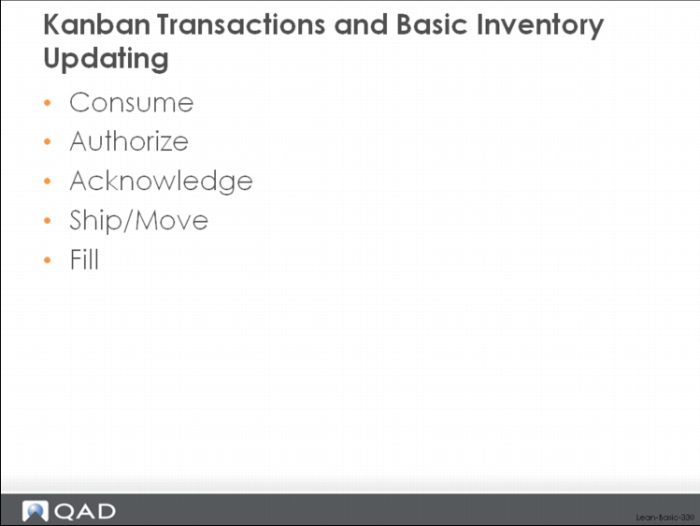
In this part of the class, we’ll look at the basic consume-fill cycle for kanban cards in a pull system. We’ll look at the basic cycle, the different kanban transactions that can happen during the cycle, and any associated inventory updating. The specific kanban transactions that we’ll look at include:
• Replenishment Kanban Transactions
Consume, Authorize, Acknowledge, Ship/Move, Fill
• Withdrawal Kanban Transactions
Consume, Fill
The important thing to remember is that the kanban card (or cards, in the case of a part that is produced in batches or lot sizes) provides the signaling mechanism to indicate that replenishment is required. Rather than looking forward over time and evaluating where inventory is likely to run out, in a kanban system usage of inventory (consumption) drives replenishment. In its simplest form, when a kanban is emptied because the inventory was used, the source process receives a signal to replenish it. The kanban is alternately emptied, filled, emptied, filled, etc. as material is used out of the supermarket, replenished, used, replenished, etc. If there is no kanban signal (no empty card) then work stops.
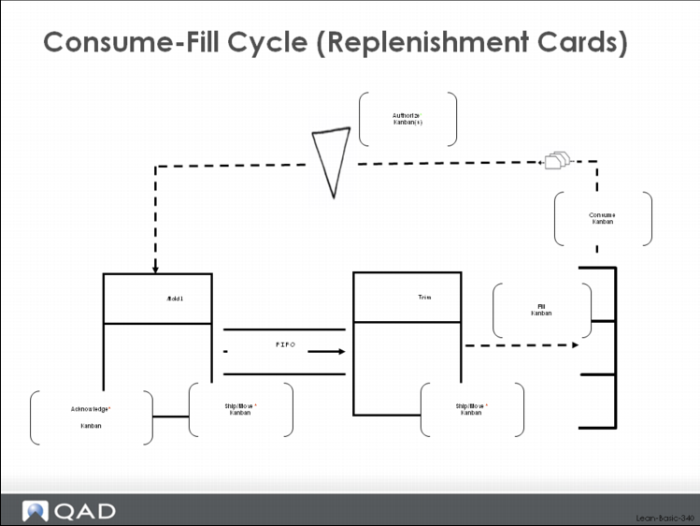
The diagram below shows a typical replenishment kanban loop, with kanban cards continuously circulating from the supermarket back to the molding process through the trim FIFO lane and back to the supermarket. Material is consumed from the supermarket, which causes a consume kanban transaction to be processed against the affected kanban cards.
Newly emptied kanbans are accumulated until they reach the required order quantity or the date the next signal is to be generated. At that point, the system automatically marks them authorized, updates the authorized date and time, and adds them to the kanban dispatch list. (Alternatively, a user can force authorize a smaller than normal batch by processing the authorize kanban transaction in the system and this would have the same effect, moving the item to the kanban dispatch list.) In a system using purely visual controls, the cards would be accumulated on a load assembly board until the order quantity was reached, at which point the cards would be transferred from the load assembly board to the kanban control board.
The acknowledge kanban transaction is purely optional. It provides a way for external suppliers to indicate that they have seen the pull signal and are preparing to ship against it. Some of the users of the system also have procedures where they acknowledge a kanban when the job has or is being set up for production. This way, someone viewing the dispatch list or a visual status display can see what is being run and what is next to run.
The ship kanban transaction has several functions. It can track material that is in transit between a supplier and the plant. It can also track material that has cleared the first (primary) process and is in the FIFO lane. As it progresses through a multi-process FIFO lane, the ship transaction can be used to update its status and location.
Consume-Fill Cycle (Replenishment Cards)
When the material eventually reaches the supermarket, it can be received using the fill kanban transaction. The fill kanban transaction marks the kanban card as full and, depending upon how you’ve set your parameters for inventory processing, can also generate backflush inventory transactions for the components and an inventory receipt for the item itself.
Consume-Fill Cycle (Withdrawal Cards)
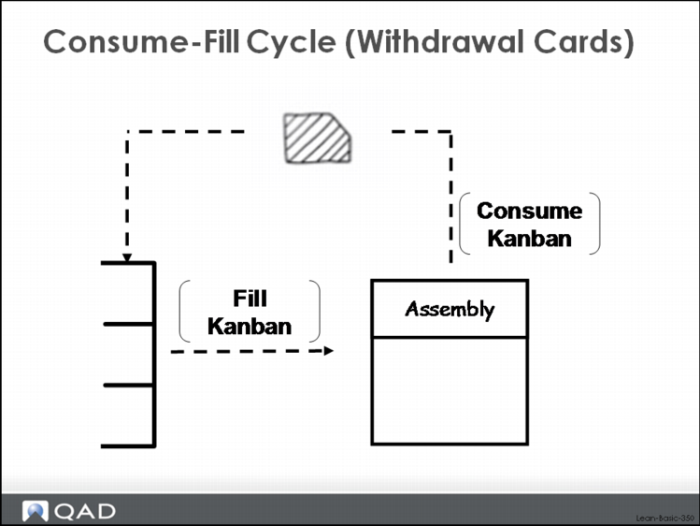
Move or withdrawal kanbans go through a similar, if somewhat simplified consume-fill cycle in QAD Lean. This is because move or withdrawal kanbans have only two transactions that affect their status: consume kanban and fill kanban. This cycle is shown in the figure above.
The diagram above shows a typical withdrawal kanban loop, with kanban cards continuously circulating from the point of use (Assembly) back to the source supermarket and then back to the point of use. Kanbans are recorded empty (they are consumed) when the material is used at the point of use. They are recorded full when material is pulled from the supermarket and moved to the downstream point of use. In the case of withdrawal kanbans there are only the consume kanban and fill kanban transactions. There are no authorize, acknowledge, or ship kanban transactions.
In the case of withdrawal kanbans, there is no inventory updating.