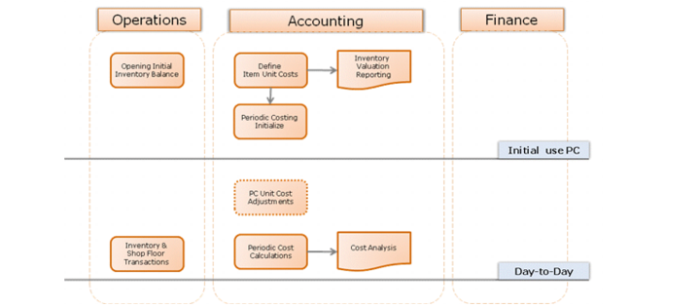
Periodic Costing Calculation
Use Periodic Costing Calculation (30.5.7.1) to run periodic costing. To run periodic cost calculations, you should:
• Enable periodic costing in Periodic Costing Control and follow the setup instructions as described earlier.
• Ensure that the previous periodic cost calendar period is closed.
General Periodic Costing Procedure
Typically, you run periodic costing calculations to ensure that costs are acceptable. You can make adjustments when results are not as expected. You can make cost adjustments to items or WOs, or locate unrecorded transactions, for example, to make corrections. After the corrections, rerun the periodic costing calculations and review the results again.
The following provides a general procedure:
1 Retrieve all cost-related data.
2 Enter opening inventory balances and costs.
3 Run periodic costing, calculating—and if necessary, recalculating—the unit cost for all items including raw material, semi-finished goods, and finished product by period labor/burden total.
4 Before posting periodic costing, ensure that all operative GL sub-ledger calendars have been closed.
5 Post periodic costing into the transient GL.
6 Run cost analysis by using report functions in the QAD Financials module.
7 Adjust costs.
8 Run GL and operation reports.
9 Move the transient GL if satisfied.
10 Close the periodic costing subledger calendar.
The following figure depicts the flow for day-to-day transactions.
Day-to-Day Flow