Setting Up Golden Tax
In order for the Golden Tax invoice process to run properly, you need to set up some prerequisite data and initialize settings in Golden Tax Invoice Control (7.13.20.1.24).
Define Golden Tax Prerequisites
• Specify the invoice upper limit for your company in Entity Create, so that QAD invoices can be split into several Golden Tax invoices. For more information, see
Upper Limits and Invoice Splitting.
• Set up the Golden Tax tax rate in Tax Rate Maintenance (29.4.1). The VAT rate in China is typically 17%. This tax rate should be referenced by specifying the tax zone when you create a sales order.
• Set up a code in Generalized Codes Maintenance (36.2.13). Specify gt_vat_code as the field name and set its value to the tax code of the VAT rate you defined in the previous step.
Set Up Golden Tax Invoice Control
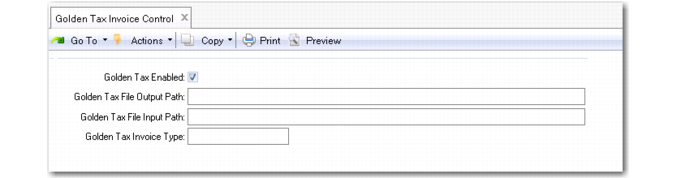
Use Golden Tax Invoice Control to enable the tax system and define processing defaults.
Golden Tax Invoice Control (7.13.20.1.24)
Field Descriptions
Golden Tax Enabled
Select to enable Golden Tax features.
Golden Tax Output Path
Specify the file path where the system places the output file to be uploaded to the Golden Tax system for VAT invoice print.
Golden Tax Input Path
Specify the default path of the file you import back into the QAD database containing information about printed invoices generated by the Golden Tax system.
Golden Tax Invoice Type
Enter the 10-digit code preprinted on the upper left corner of the blank VAT invoices that you obtain from Chinese tax bureaus. This field is only for reference.