Exporting a Golden Tax File
Exporting creates a file that contains the QAD invoices ready for print by the Golden Tax system.
To export the Golden Tax file:
1 Run Pending Invoice Extract (7.13.20.1.1).
2 Run Golden Tax File Create (7.13.20.1.2).
Extracting Pending Invoices
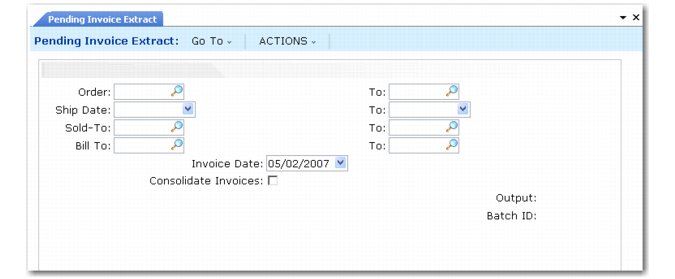
Use Pending Invoice Extract (7.13.20.1.1) to select pending invoices and prepare them for Golden Tax invoice print.
The extraction selects shipped sales orders that are subject to VAT taxation, assigns invoice numbers, and splits them according to the invoice upper limit, if necessary.
Pending Invoice Extract (7.13.20.1.1)
You can perform the following actions:
• Extract pending invoices by sales order number, shipping date, sold‑to, or bill-to.
• Extract a single pending invoice or a range.
• Optionally consolidate extracted pending invoices, so that multiple sales orders are combined into one invoice.
All sales orders with identical daybook set, sold-to address, bill-to address, currency, exchange rate, credit terms, trailer codes, tax environment, sales entity, and salespersons are consolidated into one invoice.
• Specify the QAD invoice date. Here, it specifically means the extraction date.
Creating a Golden Tax File
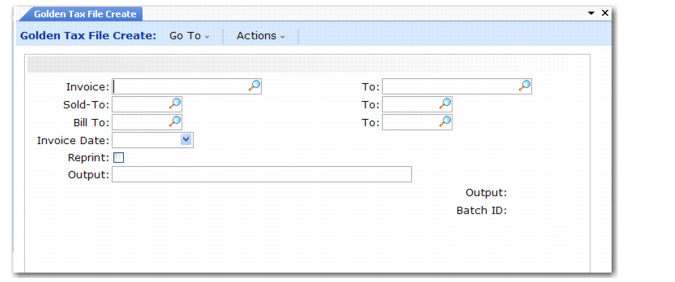
Use Golden Tax File Create (7.13.20.1.2) to select and export QAD invoices into a text file to be uploaded to the Golden Tax system for VAT invoice print.
All invoices processed in the last execution of Pending Invoice Extract are exported. The text file is generated in a standard format so that you can directly import it using an external Golden Tax program that is connected to the Golden Tax system.
Golden Tax File Create (7.13.20.1.2)
Select the invoices to include in the file to create by specifying invoice number, sold-to, bill-to, and invoice date. Then specify a path for saving the file. The path defaults from the appropriate setting in Golden Tax Invoice Control.