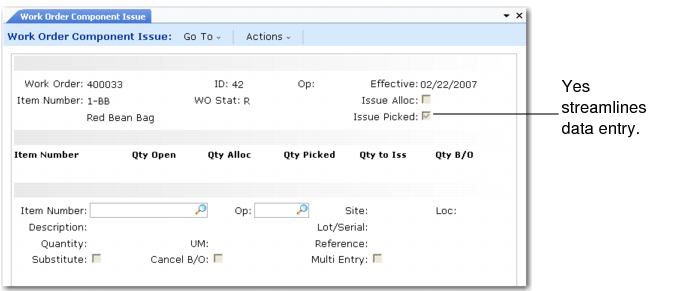
Work Order Component Issue
If all components were picked from the locations printed on the work order picklist, they can be issued automatically by setting Issue Picked to Yes. This reduces manual entry because it sets the default sites, locations, lot/serial numbers, references, and quantities from the detail allocations on the picklist.
Work Order Component Issue (16.10)
Issues are not restricted to what the system has allocated. You can override the selections manually. The work order and inventory balances are updated only after approval of the quantities to issue from inventory.
The system does not prohibit shipments from using inventory already allocated to another order. This makes timing important. The longer the period between the time a picklist is printed and the time it is picked for shipment, the greater the chances inventory will not be available when you finally try to pick it.
In some instances, when an item is not available, it is possible to substitute a different item—Philips head screws for slotted head screws, for example. When this is required, first set up valid substitute relationships in Alternate Structure Maintenance (13.15) or Item Substitution Maintenance (13.19). When a substitute item is issued to a work order, the requirement for the original component item is reduced.
Note: If you enter additional quantities or negative quantities for an item during Work Order Component Issue or a Work Order Receipt Backflush, the quantity allocated cannot become more than the quantity required or less than zero (0). It is set to the quantity required or the quantity open, whichever is less.
Components issued to a work order are posted to WIP at GL cost.