Closing Operations
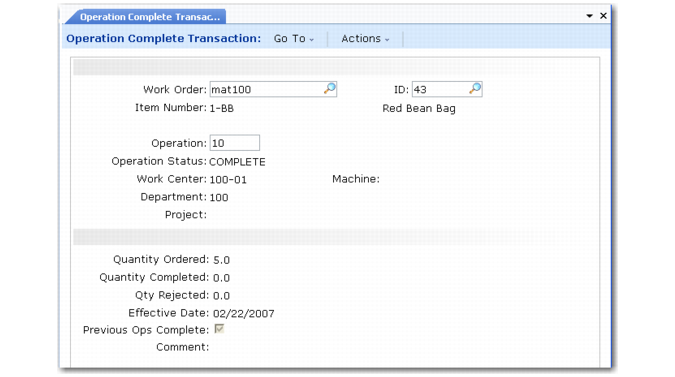
You can close an operation by running Operation Complete Transaction (16.20.5). Quantity completed for an operation needs to be entered in any of the Labor Feedback Transactions (by Work Order, Employee, or Work Center).
Setting Previous Ops Complete to Yes closes all previous open operations. For these operations, the system reflects quantity completed at the current operation being closed. The system calculates labor using the standard setup and run times for the change in completed quantity in prior operations.
Operation Complete Transaction (16.20.5)
For example, if a work order has five open operations: 10, 20, 30, 40, and 50, and no completions were reported for any of these operations, when operation 50 is closed for a quantity of 100, the system optionally closes operations 10, 20, 30, and 40 for 100 units. However, if operation 50 is closed for 75 units and 90 units had been previously reported as complete at operation 20, the system closes operations 10 and 20 for a quantity of 90 units, and operations 30 and 40 for a quantity of 75 units.
Operation | Previously Completed | Completed |
10 | 0 | 90 |
20 | 90 | 90 |
30 | 0 | 75 |
40 | 0 | 75 |
50 | 0 | 75 |
If operation 40 was closed for a quantity of 85 units, the system closes operation 30 for a quantity of 85, and operations 10 and 20 for a quantity of 90.
Operation | Previously Completed | Completed |
10 | 0 | 90 |
20 | 90 | 90 |
30 | 0 | 85 |
40 | 85 | 85 |
50 | 0 | 75 |
Note: Work Order Accounting Close (16.21) closes open operations using the same logic.
Closed operations do not contribute to the projected load for a work center.