Production Line Item Create
Use Production Line Item Create (18.22.120) to set up items on production lines in a mass update method.
To use the .NET UI-only Planning and Scheduling Workbenches to work with either master or production schedules, you must have production lines and items set up. If you have existing records but want to avoid manual re-entry of setup data, you can use Production Line Item Create to:
• Mass set up items on primary production lines.
• Mass set up items on alternate production lines.
This ensures that the Planning and Scheduling Workbenches display data and alert the scheduler of all items requiring attention.
You can either process items for this work center machine or assign items to this site or production line. The program locates sites where the item routing contains a specified work center/machine, and for those items, associates—sets up—those items to a specified production line. The default item routing is the source for the work centers associated with an item.
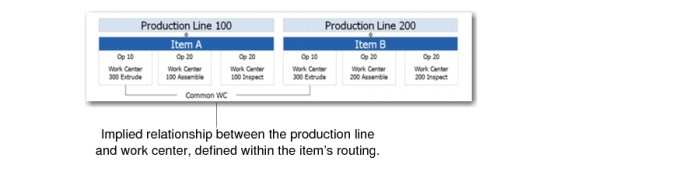
The following figure depicts the relationship between production lines and work centers.
Work Center/Production Line Relationship
Note: If the item has no routing (no item/resource record), the program does not find the item to associate with a production line.
You can run the program in batch mode to automate the process and eliminate the need to manually set up items on production lines.
The output report contains the following information:
• For each item, the current primary production and alternate production lines
• For each item, the new target production line
Once you associate items with the resource—that is, the work center, machine, or production line—you can update in mass using Production Line Item Update (18.22.1.21).
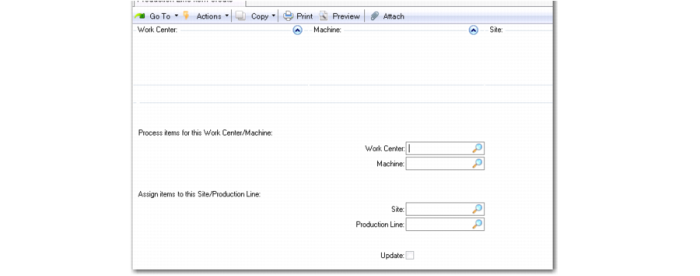
Production Line Item Create(18.22.1.20)
Process Items for this Work Center Machine:
Work Center
Specify the work center for which you want items set up for schedule processing using the .NET UI Planning and Scheduling Workbenches. Items and supporting data associated with this work center within the routing display in the workbenches.
Machine
Specify the machine for which you want items set up for schedule processing.
Assign Items to This Site/Production Line:
Site
Specify the site for the work center or machine.
Production Line
Specify the production line for which you want items set up for schedule processing.
Update
Specify Yes to update according to criteria you set here. Specify No to run a report of the mass update before you commit.