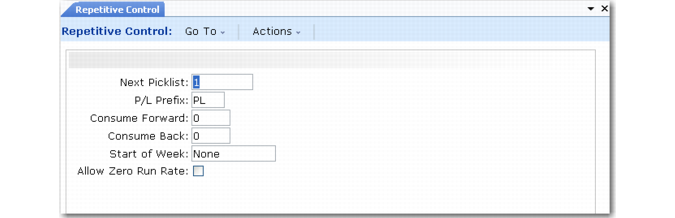
Defining Control Program Settings
Settings in Repetitive Control (18.24) differ from those in Advanced Repetitive.
Repetitive Control (18.24)
Next Picklist and P/L Prefix
Same as Repetitive Control (18.22.24) in Advanced Repetitive.
Consume Forward and Consume Back
These fields, in coordination with Start of Week, determine how the system handles item completions that exceed the quantity scheduled for a given day.
When Consume Back or Consume Forward is nonzero and you record more completions than scheduled, the system consumes open quantities on past schedules, then future schedules, based on the number of calendar days specified in these fields. Schedules with due dates before the day specified in the Start of Week field are not considered.
This process stops when all available schedule quantities are consumed or all excess completions have been recorded against a schedule.
For schedules with due dates in the past, the Consume Back value also determines which open quantities planning functions such as Material Requirements Planning (MRP) consider as sources of supply.
Start of Week
Enter the day of the week for the system to use in coordination with the Consume Back value:
• When searching for exploded schedules with past due dates on which to record excess item completions
• To determine which open quantities on past schedules to consider as sources of supply in planning functions such as MRP
Valid values are Sunday–Saturday, Today, and None.
To ensure that all completions are recorded only against scheduled orders for the current week, you can define control program settings as follows:
• Set Start of Week to the first day of your company’s business week (typically Monday).
• Set Consume Back to 7.
• Set Consume Forward to 0 (zero).
Allow Zero Run Rate
Specify whether item-level records defined in Production Line Maintenance can include a 0 (zero) value in the Units/Hour field.
No (default): The item Units/Hour defaults from the production-line run rate. The system always uses the item run rate when calculating schedules for the item. Although you can change the default, you cannot set it to 0.
Yes: The item Units/Hour defaults to 0. Unless you change it, the system uses the production line run rate when scheduling the item. Otherwise, it uses the specified non-zero item-level value.
Set the field to Yes to define a global run rate for all items on each production line. In Production Line Maintenance, you can then specify a Units/Hour value at the production-line level and leave all or most item-level fields set to 0. If individual items are exceptions, you can define item-specific run rates just for them.