Registering Routing Exceptions
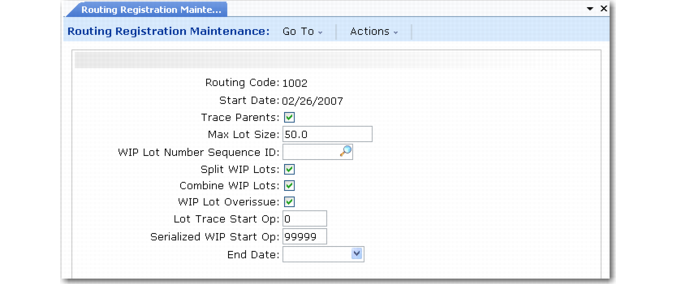
Use Routing Registration Maintenance (3.22.13.1) to define exceptions to the control program settings by creating new settings for parent item routings and routing operations that need different values than those defined in the control program.
Example: In WIP Lot Trace Control you indicate that the maximum WIP lot size is 150 because, in general, lot sizes must stay below this quantity in your manufacturing operations. However, for routing 007, you do not want the WIP lot size to exceed 50. Use Routing Registration Maintenance to specify this maximum lot size for routing 007.
Routing Registration Maintenance (3.22.13.1)
Some field values default from the control program. Additional fields are described below. Use these descriptions and any data you collected as discussed in the planning section to register control program exception records for specific routings and routing operations.
Routing Code
Enter the routing code for which you are creating a routing registration record.
Start Date
Enter the date when this routing registration record is effective. When a start date is not specified, this registration record becomes effective immediately.
When multiple registration records have overlapping effective dates, the registration with the start date closest to the transaction effective date is used.
Lot Trace Start Op
Enter the operation where WIP lot tracing should begin for the specified routing code. The default is 0 (zero). Leave this value to begin WIP lot tracing at the first operation in this routing.
Any component material consumed at operations prior to the operation specified here is not traced. The system does not prompt for input WIP lots at this operation. It prompts for input and output WIP lots at the operations that follow.
Serialized WIP Start Op
Enter the operation at which serial tracing should begin. WIP serial tracing cannot begin before WIP lot tracing begins. It must begin on or after the operation specified in Lot Trace Start Op.
Leave the default value of 99999 to indicate that serial tracing should not occur.
For WIP lots to be serial traced, transaction quantities can only be –1, 0, or 1, and WIP lot quantity-on-hand (QOH) balances must be 0 or 1.
Example: For a manufacturer of a pharmaceutical, serial tracing begins at the bottling operation, but WIP lot tracing begins at the first operation where lot-controlled ingredients are consumed. For a manufacturer of specialized components for medical equipment, serial tracing begins at the first operation that consumes a serial-controlled component.
End Date
Enter the last date that this routing registration record is effective. Leave blank to indicate that this registration should be effective indefinitely.
Once routing defaults are set, you can further define whether to allow lot splitting, combining, and overissuing per operation in the defined routing. This is done in the second frame of this program.
Routing Registration Operation Frame
Operation
Enter the operation for which you are creating a routing operation registration record.
Split WIP Lots
Enter Yes if WIP lots produced by this operation can be divided into multiple lots by the next operation.
This value only affects WIP material produced by this operation.
Example: Because Split WIP Lots is No for operation 30, WIP lots produced by operation 30 cannot be split at operation 40. One WIP lot of blank bolt studs produced by operation 30 goes into a threading machine at operation 40. The lot to be consumed at operation 40 cannot be split into separate WIP lots, such as one WIP lot of metric-thread bolts and one WIP lot of standard-thread bolts. To allow lot splitting, set this field to Yes.
This value defaults from the first frame.
Combine WIP Lots
Enter Yes if multiple input WIP lots for this operation can be combined into a single WIP output lot before being processed by the next operation.
This value only affects WIP material produced by this operation.
Example: Because Combine WIP Lots is No for operation 30, WIP lots produced by operation 30 cannot be combined at operation 40. Two WIP lots of blank bolt studs produced by operation 30 go into a threading machine at operation 40. The lots to be consumed at operation 40 cannot be combined into a single WIP lot. To allow lot combining, set this field to Yes.
This value defaults from the first frame.
WIP Lot Overissue
Enter Yes if a quantity can be issued for a WIP lot even when that issue results in a negative WIP lot quantity on hand (QOH) at this operation. This value defaults from the first frame.
This value only affects WIP material produced by this operation.
This value affects the output queue of this operation and the input queue of the following operation. When the output queue of the current operation is driven negative by a backflush at the following operation, the system must also allow for the input queue of the following operation to be driven negative.
Example: A routing has 10 operations. In this manufacturing environment, the output of operation 5 must be allowed to have negative WIP lot balances. A backflush at the next operation consumes from its input queue as well as from current operation’s output queue. For this reason, the input queue of the following operation must also be allowed to have negative WIP balances.
To do this, set WIP Lot Overissue to No in the first frame, indicating that for this routing registration record, WIP lot balances cannot be negative. In the second frame, specify Operation 5 and set WIP Lot Overissue to Yes. The value you set for operation 5 overrides the general routing value set in the first frame.