Registering BOM Exceptions
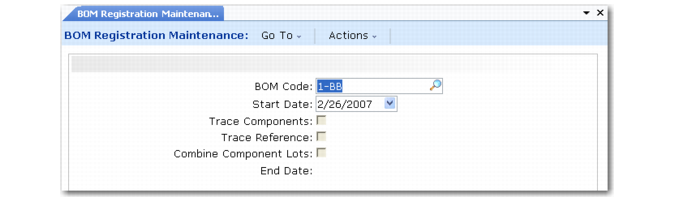
BOM Registration Maintenance (3.22.13.4) is similar to Routing Registration Maintenance. Use this program to create exceptions to the control program settings by creating new settings for BOMs.
Example: In WIP Lot Trace Control you indicate No in Trace Reference because you typically do not trace inventory references in your manufacturing operations. However, for BOM code 007 you need to trace references. Use BOM Registration Maintenance to indicate that references need to be traced for BOM 007.
BOM Registration Maintenance (3.22.13.4)
Some field values default from the control program. Additional fields are described below. Use the following field descriptions and any data you collected as discussed in the planning section to register control program exception records for specific BOMs or BOM components.
BOM Code
Enter a BOM code for which you are creating a registration record.
Start Date
Enter the date when this BOM registration record is effective. When a start date is not specified, this registration is effective immediately. When multiple registration records have overlapping effective dates, the registration with the most recent start date is used.
End Date
Enter the last date that this BOM registration record is effective. Leave blank to indicate that this registration should not end.
Optionally, use the second frame to further define whether to trace components or references and whether to allow combining of component lots for specific component items in the BOM.
BOM Registration Component Item Detail Frame
Component Item
Enter the component for which you are creating a detail BOM-registration record.
In the first frame of this program, you set up control fields that apply to all components of the specified BOM. In this frame, you can override these settings for specific components.
Trace Components
Enter Yes to trace lots of this component consumed in manufacturing operations; otherwise, enter No. To trace component items, you must also trace their corresponding parent items.
When Trace Components is Yes in WIP Lot Trace Control but this field is No, tracing does not occur when this component is consumed under this BOM code.
This value defaults from the first frame of this program. Changes you make here override the value set in the first frame for this component item in this BOM code only.
Trace Reference
Enter Yes to trace references assigned to lots of this component item.
To trace references, you must also trace corresponding component and parent items.
Example: Lot 3A of steel wire comes in three spools. Each spool is separately identified in inventory using the Reference field as Sp1, Sp2, and Sp3. When steel wire is consumed, you must enter the spool number in the Reference field during backflush. If Trace Reference is Yes, the spool numbers are recorded in tracing history and display in the Lot Where Used and Lot Actual Bill reports. They also display in transaction detail reports and inquiries.
This value defaults from the first frame of this program. Changes you make here override the value set in the first frame for this component item in this BOM code only.
Combine Component Lots
Enter Yes if multiple lots of this component can be consumed into a single WIP lot/serial.
Combine Component Lots is No for steel. Two lots of steel, lot A and lot B, are in the storeroom. Lot A is processed at the first operation, becoming WIP lot W1, and is backflushed accordingly. If you try to backflush steel lot B into WIP lot W1, the system displays an error. Only one lot of steel can be consumed into WIP lot W1.
This value defaults from the first frame of this program. Changes you make here override the value set in the first frame for this component item in this BOM code only.