Multilevel Master Scheduling
Sometimes, demand for one item is dependent on demand for another item. This is typical in assemble-to-order environments where it is unrealistic to stock all of the possible combinations of end items included in the selection of available models and options.
In these cases, it is impossible to accurately forecast all of these possible combinations for master production scheduling purposes. Instead, you can forecast items at the family-item and planning or option-item levels. Multilevel master scheduling enables you to perform this type of forecasting for planning purposes.
Planning Bills
You can establish the relationship between family-level items and component items by defining planning bills in Product Structure Maintenance (13.5) or Formula Maintenance (15.5). These are identified with a structure type of P (planning).
Usually, the top-level item of a multilevel master schedule product structure, or planning bill, represents the entire group, or family, of products that can be configured from a set of available models and options. Family items are never manufactured or stocked. You must define family items with a Pur/Mfg code of Family (F) in Item Master Maintenance (1.4.1), Item Planning Maintenance (1.4.7), or Item-Site Planning Maintenance (1.4.17).
Components of the family item in the planning bill can be any type of item: manufactured, configured, or another family item.
A planning bill also contains a forecast percentage. The forecast percentage is the probability that a component of the family-level or parent item will be required, given the requirements for its parent. Components with structure code Planning consume the forecast for their parent.
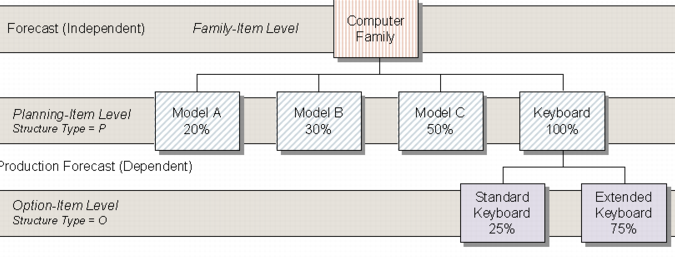
Example: The sale of a specific type of computer, entered in the planning bill with a structure code of Planning, consumes the computer family forecast, but the sale of an extended keyboard, an option, does not.
Option Bills
Structure type O (option) also affects forecasting and master scheduling. Options are typically used with configured products to indicate one of a set of choices.
Option bills are treated in the same way as planning bills by master scheduling. The forecast percentage and quantity per for the option determines the production forecast. However, unlike components in a planning bill, independent demand can often exist for an option.
For example, a Zip drive is an option for a computer model. You enter a forecast percentage indicating how frequently a Zip drive is included when a computer is purchased. Zip drives can also be sold as a separate item.
When you sell a Zip drive separately, it does not consume production forecast. If, however, you have an independent forecast for the zip drive, not derived from upper-level requirements, it will be consumed.
If you know that an option will be sold both by itself and as part of another item, you can plan production by either increasing the forecast percentage associated with the product structure or entering independent forecast in Forecast Maintenance Production Forecasts.
Production Forecasts
When you establish planning bills and forecast and master schedule at the family-item level, the system automatically calculates the derived demand for components of the family or upper-level item. These calculations are based on the ATP quantities for the family-level item and the quantity per and forecast percentage for the components of that family item. The result is called a production forecast, since it derives from the master production schedule and the forecast percentage specified in the planning bill.
Production forecasts are only created for components with structure codes P and O. Production forecast amounts display in MPS reports and inquiries and contribute to the total demand that MRP regards as input.
As forecast for the family-level item is consumed, the ATP quantity for that item changes, resulting in revised calculations for the production forecast the next time MRP is run.
Multilevel Master Scheduling Example
Multilevel Scheduling Techniques
When using multilevel master scheduling, you can plan family-level items using either the fully automatic or the computer-assisted technique. Either way, you must use MRP to plan orders in order to generate production forecasts for the components of these family items.
Set the following values for family-level items in Item Master Maintenance (1.4.1) or Item Planning Maintenance (1.4.7).
Master Schedule
Yes.
Plan Orders
Yes.
Order Policy
Any option other than blank.
Time Fence
Optional.
The components of a multilevel master schedule can be planned using either the fully manual or computer-assisted technique.