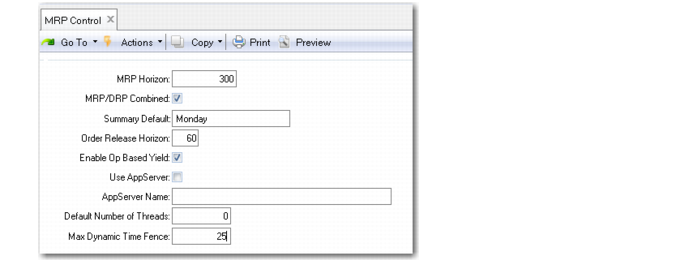
MRP Control
Enter appropriate values in MRP Control (23.24).
MRP Control (23.24)
MRP Planning Horizon
Enter the period of time, in calendar days, which MRP should plan. MRP calculations ignore data outside this time period. The horizon should be at least one day longer than the longest item cumulative lead time in the database.
If you change the MRP planning horizon, impacted items are not automatically replanned when you run net change MRP. Ensure that all items are replanned by running MRP in regenerative mode.
MRP/DRP Combined
Enter Yes to indicate that MRP planned items can be planned using DRP functions. Enter No if they can only be planned using MRP functions. See User Guide: QAD Supply Chain Planning.
Summary Default
Specify the day of the week used by all MRP summary reports and inquiries when displaying item requirements summarized by week.
Order Release Horizon
Enter the number of calendar days before a planned order’s release date on which the Release Due For action message should appear.
The order release horizon should be based on your normal paperwork lead time and how often you run MRP. For example, if you run MRP weekly, you should set the order release horizon to at least seven days. If you run MRP daily, you can set it to zero.
Enable Op Based Yield
This field determines how the system calculates yield for component items when product structures and routings are exploded in material requirements planning (MRP) programs, work orders, repetitive, advanced repetitive, and configured products. See
Operation-Based Yield.
No: The system uses the Yield % field associated with the parent item in Item Planning Maintenance or Item-Site Planning Maintenance to calculate component requirements.
Yes: The system derives the yield percentage amount for components from operations on the parent item’s routing. The Yield % field associated with the item is used for the parent item only, not the components.
Even when Enable Op Based Yield is Yes, operation-based yield is only calculated for parent items with Operation Based Yield set to Yes in either Item Planning Maintenance (1.4.1 or 1.4.7) or Item/Site Planning Maintenance (1.4.17).
Setting this field to Yes typically results in more accurate calculations and prevents overplanning of components. This is especially true in a mature process where yield percentages are highly predictable.
Use AppServer
Specify whether your system uses a Progress application server to enhance MRP performance. See
Improving MRP/DRP Performance.
AppServer Name
When Use AppServer is Yes, enter the name of the application server that is configured to run the MRP programs. The value you enter must already be defined in AppServer Service Maintenance (36.19.1).
Default Number of Threads
When your system uses an AppServer for MRP processing, enter the default number of processing threads, or agents, that the AppServer can create. This can be any integer up to 99.
This value defaults to the Number of AppServer Threads field in the MRP programs. You can update it based on the overall load on your system when you run MRP.
As a general rule, set this field to twice the number of processors your computer has. For example, if you have a dual-processor machine, set the field to 4. You can adjust it based on how well your system and MRP perform.
Max Dynamic Time Fence
Specify the number of days that the system will use in determining a dynamically calculated time fence that controls whether MRP/DRP can replan orders.
When this value is greater than the Time Fence value specified for the item master or item-site, the system adds Max Dynamic Time Fence to the current date, and sets the time fence as the due date of the last order that falls within this period. In effect, this prevents scheduled receipts far in the future from affecting when new planned orders are created.
When this is zero (the default) or less than the value specified for the item, the system adds the item time fence to the current date and uses that as the time fence.