Executing CRP
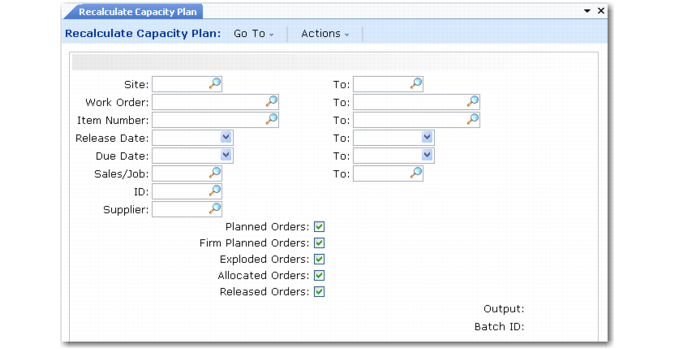
Generate capacity requirements for manufacturing orders using Recalculate Capacity Plan (24.1).
Note: Generally, you should run CRP after running MRP.
Recalculate Capacity Plan (24.1)
CRP determines capacities based on the available hours or machines for a work center or department. It multiplies working days, defined in the shop calendar, by work center machine capacity to calculate capacity per CRP reporting period.
CRP explodes the routings and processes for the orders you select. It then determines capacity requirements for selected manufacturing orders by scheduling their operations. CRP determines operation start and due dates using the work center and shop calendars and a technique called back scheduling.
Back Scheduling
When CRP back-schedules orders, it takes the due date of an order or repetitive schedule and schedules each of its operations from the last operation in the order routing or process backward to the first one.
CRP assigns each operation a start date and a due date, using the operation lead time components—queue, setup, run, wait, and move—to calculate operation start dates. The start date of an operation is the same as the due date of the previous operation.
Note: CRP calculates run times based on the actual order quantity—that is, the order quantity less the quantity completed.
When manufacturing order operations overlap, the system smoothes the scheduled start and due dates to prevent the scheduled due date for one operation from occurring later than the due date for a subsequent operation.
Schedule Discrepancies
MRP calculates manufacturing order release dates using a manufacturing lead time that is based on an average order quantity defined in Item Planning Maintenance (1.4.7) or Item-Site Planning Maintenance (1.4.17). If the order quantities used in CRP calculations differ from this average quantity, CRP may schedule the start date for an order’s first operation before the release date for that order.
When this occurs, a message displays to alert you of the conflict. You can resolve such conflicts by adjusting the order release or due date and rerunning CRP.
Note: Exceptions to the normal work week in the work center and shop calendars—for example, planned overtime—may also cause schedule discrepancies in CRP.
CRP and Order Statuses
CRP is normally executed for Planned and Firm Planned orders. For these orders, CRP explodes the standard item routing and schedules the operations to create work center/machine load.
You can also choose to include orders with other statuses. For Exploded and Allocated orders, the work order routing is scheduled. For Released orders, only open operations are rescheduled.
Note: Repetitive schedules are treated like Exploded orders.
When you run CRP, all open operations for selected work orders are rescheduled. That means that if you have manually adjusted your operation start and stop dates, they will probably be changed unless you also adjusted the work order release and due date to match.