Generating Load Reports
You can generate load reports by department, work center, or machine using the work center and department load inquiries and reports.
CRP determines load hours for a work center based on setup and run times. Queue, wait, and move times are excluded from load calculations. To include queue times in load calculations, set up separate operations for queue. CRP then considers these operations when calculating load.
CRP determines the load an operation exerts on a work center using the following calculation:
Operation Load = Setup Time + (Run Hours/Unit x Quantity Open)
The quantity open for an operation is the order quantity minus any quantities reported complete.
Note: The system assigns the entire load for an operation to its scheduled start date. Even for operations with run times longer than one day, load is not spread between operation start and due dates.
Reviewing Input and Output
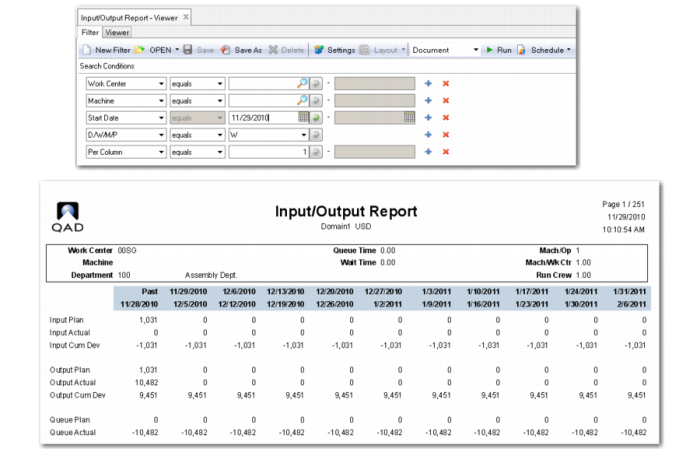
You can compare the planned input and output for a work center or machine with actual input and output using Input/Output Inquiry (24.4) and Input/Output Report (24.5). These functions help you evaluate a work center or machine’s response to planned loads.
Note: Input/Output Report is also available in enhanced report format (24.29). That version can only be used in .NET UI.
You can display planned and actual input and output in daily, weekly, or monthly periods.
Planned Input
Planned input is load on a work center or machine represented by work order operations scheduled to start in a reporting period. It is determined using the following calculation:
Standard Setup + (Standard Run * Quantity Ordered)
Actual Input
Actual input is load that has been moved to the first and subsequent order operations. It is calculated for a reporting period based on move transactions entered using work order release and shop floor control functions. Actual input is determined using the following calculation:
Standard Run Hours * Quantity Moved
Planned Output
Planned output is load calculated based on order operations scheduled to be completed in a reporting period. It is determined using the following calculation:
Standard Setup + (Standard Run * Quantity Ordered)
Actual Output
Actual output is load calculated for a reporting period based on operation quantity completed transactions for work orders and repetitive schedules. You can report completed quantities for order operations using labor feedback transactions in the Shop Floor Control, Advanced Repetitive, and Repetitive modules, or using Work Order Accounting Close (16.21).
Actual output is determined using the following calculation:
Actual Setup + (Standard Run * Quantity Completed)
Planned Queue
The planned queue is the difference between planned input and planned output.
Actual Queue
The actual queue is the difference between actual input and actual output.
Enhanced Input/Output Report, .NET UI only (24.29)