|
This Main Dashboard Panel
|
Contains this Data
|
Links to This Additional Data
|
|
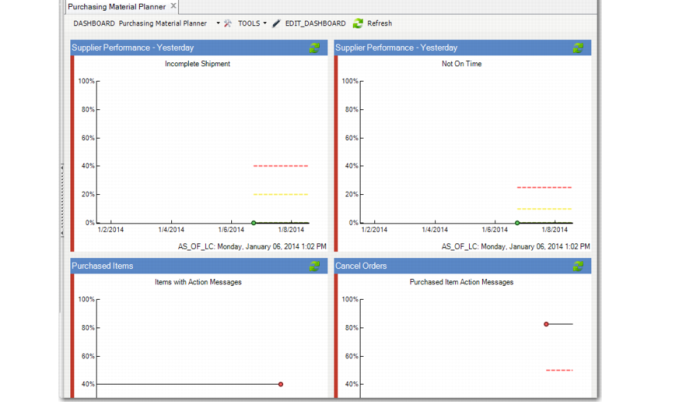
Supplier Performance - Yesterday (Operational Metric):
• Incomplete Shipment
• Not On Time
|
Supplier Performance tab with data on Yesterday, Last 7, and Last 30 days and totals for each category and incomplete and Not on Time data
|
Incomplete browse
Not on Time browse
Suppler performance yesterday, last 7 days and last 30 days browses
|
|
Purchased Items with Action Messages (Operational Metric)
|
Planning Process Diagnostics tab with Purchased, Manufactured, DRP and MPR items and totals for each.
|
Items with Action Messages browse
Purchased, Manufactured, MRP, and DRP browses
Manufactured items browse
|
|
Cancel Orders (Operational Metric)
|
Planning Process Action Message tab with Reschedule by more than 5 days, Orders Due/Past Due for Release, Orders Past due, cancel orders
|
Manufactured, Purchased, DRP Item Action Messages browse
Blank P/M Code Item Action Messages
Reschedule by more than 5 days, Orders Due/Past Due for Release, Orders Past Due, Cancel Orders and Orders Past Due browse
|
|
Orders Due/Past Due for Release (Operational Metric)
|
Planning Process Action Messages tab with Reschedule by More than 5 Days, Orders Due/Past Due for release, Orders Past Due, Cancel Orders, and Totals for each
|
Reschedule by More than 5 Days, Orders Due/Past Due for Release, Orders Past Due, Cancel Orders, and Totals browses
Manufactured Item, Purchased Item, DRP Item, and Blank P/M Code Item Action Messages browses
|
|
Orders Past Due (Operational Metric)
|
Planning Process Action Messages tab. See previous cell.
|
|
|
Reschedule by More than 5 Days (Operational Metric)
|
Planning Process Action Messages tab.
|
|
|
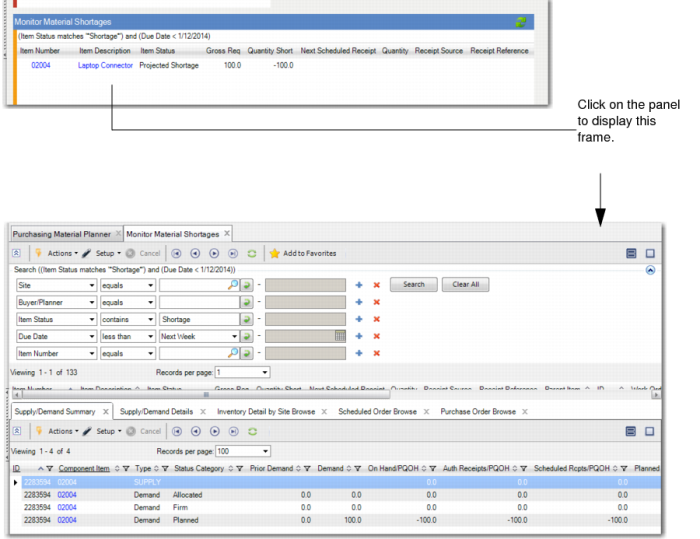
Monitor Material Shortages (Browse)
|
Monitor Material Shortages browse collection; refer to the Component Availability Check user documentation in User Guide: Manufacturing
|
|
|
On Time In Full Delivery Performance (BI Metric)
|
Links to BI; refer to your Business Intelligence user documentation
|
|
|
Average Days on Site (BI Metric)
|
Links to BI; refer to your Business Intelligence user documentation
|
|
|
Inventory Turns by Site (Year) (BI Metric)
|
Links to BI; refer to your Business Intelligence user documentation
|
|
|
Cash Requirements Forecast (BI Metric)
|
Links to BI; refer to your Business Intelligence user documentation
|
|