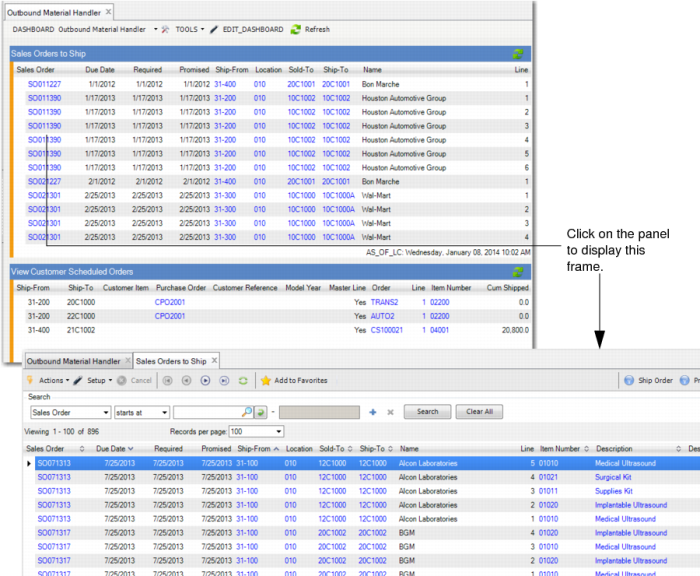
|
This Main Dashboard Panel
|
Contains this Data
|
Links to This Additional Data or Function
|
|
Sales Order to Ship (Browse)
|
Single browse
|
SO Master, SO Shipper Maintenance, Pre-Shipper/Shipper Workbench, Pre-Shipper/Shipper - Automatic
Item Location Qty on Hand, Location Master, Customer Master, Cust Ship-To Address browses
|
|
View Customer Scheduled Orders (Browse)
|
View Customer Scheduled Orders browse collection
|
Plan Sched Detail, Ship Schedule Detail, Customer Ship Schedule, Required Ship Schedule Detail, Shipment History, Item Master browses
Cumulative Shipped Maintenance, Customer Scheduled Order Maintenance,
Note: You can create and modify from the View Customer Scheduled Order browse.
|
|
Intersite Demand (Browse)
|
Single browse
|
Item Master, UM Master browse.
|
|
Stock Availability (Browse)
|
Single browse
|
Item Master, Inventory Value and Usage, Item-Site Inventory Data Maint, Item-Site Cost Maintenance, ATP Enforcement Check
Sites, Item Site Planning Data, Action Messages, Item-Site Inventory Data Maint, Item-Site Planning Maintenance, Item-Site Cost Maintenance
Item Descriptions, Product Line Master, UM Master browses
|