Specify Telnet Server Settings
Use the following instructions to configure telnet server settings:
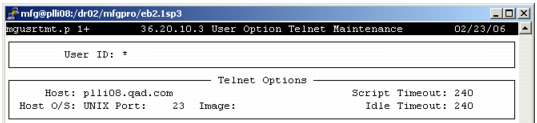
1 Log in to your QAD EE application and access User Option Telnet Maintenance (36.4.14, mgusrtmt.p).
2 In the User ID field, enter * to specify a generic record and select Go.
User Option Telnet Maintenance, Telnet Options
3 Use the following descriptions to complete the Telnet Options fields:
Host
Enter the fully qualified machine name or telnet server IP address. The script uses this information to establish the telnet connection.
Host O/S
Enter UNIX for Linux/UNIX systems. Enter NT for Windows systems.
Port
Enter the port number for the telnet server. The default value is 23, the normal setting for non-SSH configurations. If you plan to use SSH, the port value is 22. See
Set Up SSH.
Image
Leave this field blank; it is currently unused.
Script Timeout
Enter the number of seconds (1 to 999) the system waits for the telnet login script to execute. Exceeding this value displays a time-out message and closes the session.
Idle Timeout
Enter the number of seconds (1 to 999) the system will wait after a telnet session begins for a program to execute.
Note: Idle timeout is not used in the QAD .NET UI.
4 Select Go to continue.