Audit Detail Delete/Archive
Use Audit Detail Delete/Archive (36.23.1) to delete/archive audit detail information. Unlike other delete/archive programs, this program does not delete each record specified. Instead, for each unique combination of user ID, table, and field, it keeps the latest record and deletes/archives the rest.
To delete and/or archive tables:
1 Back up your database and .df files.
1 To safeguard against data archived from a previous product version that has different schema, back up the current database definitions (.df) file with each archive/delete run. This lets you reconstruct a corresponding database for data retrieval.
2 Verify record selection.
Run the delete/archive program without deleting or archiving records. This generates a report showing selected records. Review the report and if records selected for deletion are correct, proceed with the actual archive/delete.
3 Run appropriate historical reports such as Invoice History Delete/Archive (7.13.23).
4 Determine selection criteria for the records being deleted, and run the delete/archive program, selecting both Delete and Archive.
The program creates a xxyymmdd.hst file in the default directory where xx is the record identifier, such as iv for invoices and yymmdd is the archive date.
5 Verify deletion of records from the database.
6 Verify the contents of the .hst file using the appropriate operating system command.
7 Back up the .hst file to storage media and delete from system.
The delete/archive program does not reduce database size. To reduce database size, use a dump/load program.
Restoring Archive Files
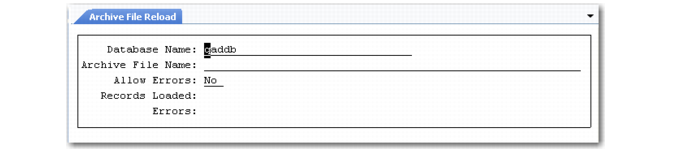
Use Archive File Reload (36.16.5) to reload an archive file after restoring the file from backup media to the system disk.
Archive File Reload (36.16.5)
The reload process puts data from the archive file back into the database exactly as it was when you deleted it. However, if base data has changed, you may encounter errors.
Example: You are reloading accounts receivable history for a customer that has been deleted.
Select Allow Errors to continue processing when errors occur. The system lists load errors in a .e file located in the directory you ran the process from.
Important: Date and time in the stored data are formatted based on the country code associated with the user who archived the data. If a user with a different date and time format reloads the data, load errors and corrupted data can occur.
To avoid these problems, use the same user settings when archiving and reloading the data. Before loading data, use User Maintenance (36.3.1) to temporarily change your country code to match that of the user who archived the data. See User Guide: QAD Security and Controls.