Currencies
Use the Currency activities (26.1) to create, view, modify, and delete currencies.
Currency codes identify specific monetary units. You define a currency at a database level, and global currencies are predefined in the system using three-character ISO codes. The currency description can be specified in all languages, and can be up to 24 characters in length. Assign an inactive status to a currency that is no longer in use, which ensures that it cannot then be associated with any other records.
Currency amounts are rounded based on the associated rounding method. The display of the decimal point is based on settings associated with country codes in the locale.dat file:
• For customer-facing records, such as invoices, the system uses the country code of the customer to retrieve the relevant decimal point indicator from locale.dat.
• For supplier-facing records, such as purchase orders, the system uses the country code of the supplier to retrieve the relevant decimal point indicator from locale.dat.
• In certain operational functions, the display of currency amounts is formatted based on the country of the intended recipient; for example, the customer country code, supplier country code, or user country code. See
Currency Display for more information.
The locale.dat file is described in your QAD application installation guide.
Once defined, a currency code cannot be deleted or deactivated if:
• It is specified as the base currency for the current domain.
• It is referenced in a current or future exchange rate relationship.
Each transaction can have base, transaction, and statutory currency values associated with it.
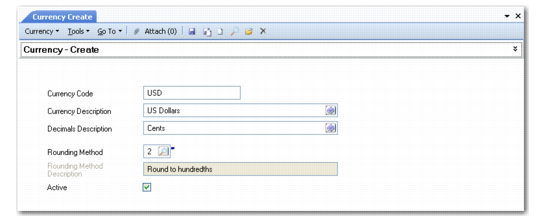
Currency Create
Field Descriptions
Currency Code
Enter an ISO standard code identifying a currency.
Currency Description
Enter a brief description (maximum 24 characters) of the currency code. This description displays on various reports and inquiries. Descriptions typically include the name of the country and monetary unit, such as Japanese yen or New Zealand dollars.
Decimals Description
Enter the descriptive word (maximum 20 characters) for the secondary amount of the currency, which is displayed after the decimal point. For example, the secondary amount for dollars is cents, and for euro is cent. The system uses this description when printing out the text version of an amount; for example, ten dollars and fifty cents.
Rounding Method
Select the rounding method to apply to the currency.
Description
The system displays the description of the rounding method you selected.
Active
Indicate if this is an active record.
When you mark a new currency code as active, it is available to assign to new customer or supplier records as their default currency. In addition, you can create customer and supplier invoices with that currency.