Country
Use the Country activities (36.1.3.1) to create, modify, view, and delete country codes. These codes identify countries and are specified when business relations are defined. Country codes apply to all entities and domains in a database.
Additional attributes of countries can be defined in Country Code Data Maintenance (2.14.1). These attributes are used in operational functions, such as Regulatory Attributes. For details on Country Code Data Maintenance and the QAD Regulatory Attributes module, see
QAD Master Data User Guide.
The country code associated with an address is used to determine the number and date formats displayed on reports. Internal reports use the country of the user; external reports the country of the sold-to or destination customer or supplier address.
A default set of ISO country codes is supplied with the system.
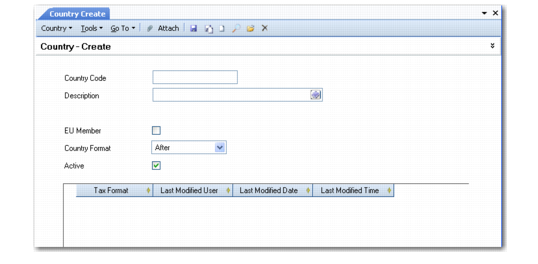
Country Create
Field Descriptions
Country Code
Enter a code (maximum three characters) that identifies a country. This field is mandatory; the code cannot be blank.
Using the ISO coding structure is recommended because this standard is often required for international communication between banks.
Description
Enter a brief description (maximum 28 characters) of the country. This field is mandatory; the description cannot be blank.
You can optionally enter descriptions in more than one language. For more information on the Translation Option, see
Introduction to QAD Enterprise Applications User Guide.
EU Member
Indicate if the country belongs to the European Union.
This information is used by the system to determine when a transaction relates to an intra-EU inventory movement, and what type of transaction it is. These transaction types display in various tax reports.
If Use Intrastat in Intrastat Control (2.22.24) is enabled, the system automatically creates Intrastat history records for these transactions.
See
QAD Intrastat User Guide for information on Intrastat.
Postal Format
This field determines where postal codes display on printed addresses. It defaults to the Business Relation function when addresses are added for the country. Valid values are:
After: Postal code prints after the city and state.
Before: Postal code prints before the city and state.
This code affects only addresses printed on documents meant to be mailed, such as invoices, purchase orders, mailing labels, statements, checks, and reminder letters.
Active
Indicate if this is an active record.
Tax Format
Specify the format for tax identification and tax declaration numbers associated with this country. This format is used to validate the tax IDs specified in the State Tax ID field in the Tax Information tab of the business relation, customer, and supplier functions when the address references an EU member country.
European VAT registration numbers follow strict formats dictated by regulatory authorities, and vary from country to country. You can find lists of valid formats on Web sites such as the following:
You can right-click to add multiple rows to this grid; some EU countries such as the Czech Republic allow multiple formats.
Use the following characters to build the format:
• 9 is 0–9 only.
• ! is any letter.
• A-Z are treated literally.
Example: For tax IDs in Italy, the first two characters must be IT followed by exactly 11 numbers (0-9).To specify the format for Italy, enter IT99999999999.
For Austria, the tax format is the letters AT followed by 9 letters or numbers. To validate for this format you need to create validation rows as follows:
AT999999999
AT!!!!!!!!!