Autonumbering Sequences
You can set up sequence numbers to be used to automatically generate numbers for:
• Business relations
• Customers
• End users
• Suppliers
• Employees
When you leave the code field blank in the activities that create these records, the system supplies a number based on the defined autonumber sequence.
These sequences are all defined in a similar way. However, the scope of the sequence differs for the various types of records:
• Business relation autonumbers are database wide.
• Supplier, customer, and end user autonumbers apply at the shared set level.
• Employee autonumbers apply to each domain, and a domain code must be specified.
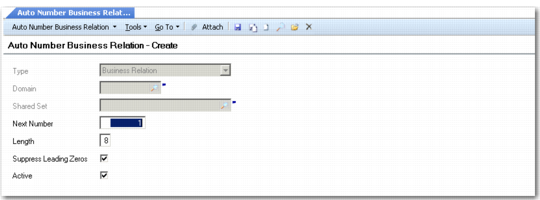
Autonumber Business Relation Create
Field Descriptions
Type
This field cannot be updated. It automatically displays the type of component that this autonumbering sequence applies to.
Domain
This field applies to numbering sequences for employees. You can set up a separate sequence for each domain by specifying a domain code.
Shared Set
This field applies to customers, suppliers, and end users. Specify the shared set that this numbering sequence applies to.
Next Number
Specify the next number in the sequence. The system assigns this number to the next record created, and automatically increments the number for each subsequent record.
The number you define must be greater than the number previously defined in the Next Number field.
If you enter a number that has already been assigned to a record, the system displays an error message.
Length
Specify the maximum allowed length for the generated number. The system uses this value to determine the number of leading zeros to add, when required, and to validate automatically generated numbers to ensure they do not become too long.
Suppress Leading Zeros
Select the field to prevent the system from adding leading zeros to generated numbers that are less than the maximum length.
Active
Select the field to enable autonumbering for the relevant function—business relations, customers, suppliers, or employees.