Bank File Format Import
To configure and install predefined bank formats, you use a number of EDI eCommerce functions to create a definition for the specific bank file format. For the EDI eCommerce steps required, see
QAD System Administration User Guide.
You then use Bank File Format Import (31.23) to import predefined bank format XML files for use with electronic bank payments. Each imported format file is specific to an individual bank and contains the payment information and attributes required for that bank. Once the file is imported, a payment format with the same name is displayed in Payment Format Maintenance. You can then link this format to the bank account you intend to use for electronic payments.
The format definition files are usually delivered by the bank in zipped XML format. You unzip the files to a server directory and then load the files into the system using the Import function.
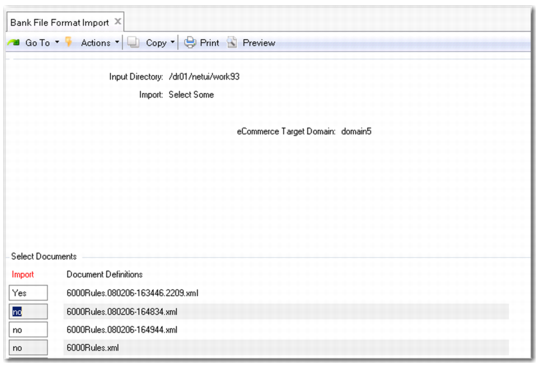
Bank File Format Import
Field Descriptions
Input Directory
Specify the input directory from which to load the XML definition files. This is the same server directory in which the original bank files were stored.
Import
Choose from the following selection options:
Select All. All the format files in the directory are imported, and a payment format is created for each one.
Select Some. Select one or multiple files to import. The system displays the Select Documents frame, which is a list of the format files available in the input directory.
You can use the keyboard arrow keys to scroll through the list of available import files before selecting. Press the space bar or use the Enter key to select a file. Press F1 or F4 to exit this selection screen.
eCommerce Target Domain
This read-only field indicates the eCommerce domain into which the trading partner information is loaded. eCommerce domains are associated with one or many QAD domains and are described in
QAD EDI eCommerce User Guide.
The system prompts you to confirm that all information is correct. Choose No to cancel the import.
Note: You cannot overwrite existing format files of the same name.
When the import is completed, review the log file in the import directory for errors or warnings. For example, the function directory may not exist, or a user-defined function may not compile correctly. This log file is named:
library-import-<today’s date>-(nn).log
and is stored in the input directory.
Optionally, for outbound definitions, verify the destination directory and file name counter in Transmission Group Maintenance (35.13.13). These fields define where exported files are written and which eCommerce NRM sequence is used to generate file names.
Note: The Transmission Group name matches the Trading Partner ID and also maps to the bank format name.