Using Another Customer or End-User Address as the Ship-To
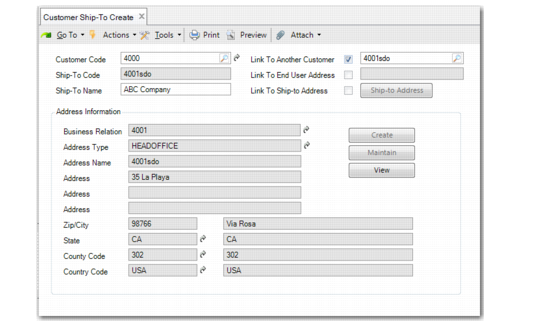
You can use the Link to Another Customer and Link to End User Address check boxes to associate another customer or an end user of the current customer as the ship-to. This works the same for both fields; linking to a customer is described here. Address details from the headoffice of the business relation associated with the customer or end user are referenced.
1 Specify the customer code.
2 Leave the Ship-To Code field blank.
3 Select the Link to Another Customer field. This enables the field to the right of the check box.
4 Click the lookup button in the newly enabled field and select the customer address you want to use.
The customer code displays in the Ship-To Code field and the address details of the headoffice of the customer’s business relation display in the Address Information area. The address cannot be modified; tax and contact details can be viewed by clicking the View button.
Ship-To Using Another Customer
5 Click Save.