Payment Group
You use payment groups to link multiple suppliers together and to use as filter criteria when making supplier payment selections. Payment groups are linked to suppliers, and let you search for invoices from multiple suppliers when you create the payment selection. You link a payment group with a supplier on the Payment tab of Supplier Create (28.20.1.1).
Use the Supplier Payment Group activities (28.9.1.3) to create, view, modify, and delete payment groups. You can delete only groups that are not referenced in the system.
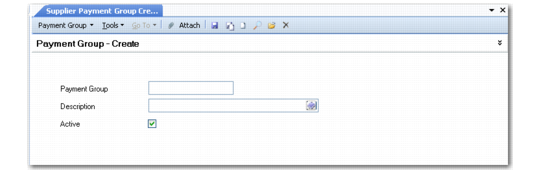
Supplier Payment Group Create
Field Descriptions
Payment Group
Enter a code (maximum 20 characters) that identifies a payment group.
Description
Enter a brief description (maximum 40 characters) of the payment group.
You can optionally enter descriptions in more than one language. For more information on the Translation Option, see
Introduction to QAD Enterprise Applications User Guide.
Active
Indicate if this is an active record.