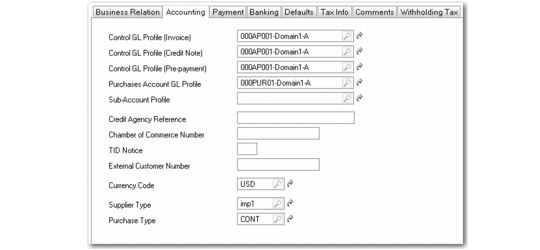
Accounting Tab
Use the Accounting tab to set up control accounts, tax details, and other accounting information.
Supplier Create, Accounting Tab
Field Descriptions
Control GL Profile (Invoice)
Specify a valid, active GL profile of type Supplier Account that identifies the accounts payable control account for invoices. This is a required field.
Control GL Profile (Credit Note)
Specify a valid, active GL profile of type Supplier Account that identifies the accounts payable control GL account for credit notes. This is a required field.
Control GL Profile (Prepayment)
Specify a valid, active GL profile of type Supplier Account used to determine the accounts payable GL control account for prepayments. This field is required.
All functions that create prepayments use the GL account linked to this profile, including Banking Entry, Open Item Adjustment, Customer Payment Create, Supplier Payment Create, and Supplier Payment Selection.
Purchases Account GL Profile
Specify valid, active GL profile of type Purchases Account used to determine the account for purchases. This field is required.
When an purchase order is created for this supplier for a non-inventory item, the default account used is determined by the Purchases Account Profile value, the default cost center defined for this account, and the sub-account found in the Sub-Account Profile.
Sub-Account Profile
Optionally specify a default sub-account profile. If the account specified by the Purchases GL Profile of the supplier requires a sub-account, the value used is either:
• The sub-account found in this profile, if specified
• The default sub-account associated with the GL control account
Credit Agency Reference
If relevant, enter the credit agency reference number assigned to this supplier. This field is for reference only. It displays on the Supplier Performance Report to help you investigate customer credit issues.
If your company does not use reference numbers as tracking identifiers, record any other identifier you use for credit investigations.
One common credit agency is Dun & Bradstreet, a provider of business-to-business credit and business-related information for both publicly and privately held companies. The D&B number is a distinctive nine-digit number used as an identifier in electronic data interchange (EDI) and global electronic commerce transactions.
Suppliers doing business with your company using EDI can submit their D&B number as part of the registration and transaction processes. This number eliminates errors in electronic transactions and serves as a consistent trading partner.
Chamber of Commerce Number
Enter an optional registration number assigned to this address code, typically, the Chamber of Commerce registration number.
This field is for reference only, and appears on various reports and inquiries.
TID Notice
Optionally, enter the number of times the US Internal Revenue Service has notified you that this supplier’s tax ID number is invalid.
External Customer Number
Enter the external customer number (maximum 10 characters) associated with this supplier.
This number applies to some check print requirements, and follows the name and address of the supplier.
Currency Code
Specify the default currency code for this supplier. Currency defaults from the domain base currency.
Supplier Type
Enter an optional code classifying suppliers by type. For example, you might classify suppliers as type RAW for raw material suppliers and SUB for subcontractors.
You can use supplier type to select groups of suppliers for reporting, in particular for supplier and accounts payable reports. If you are in the US and submit 1099 tax reports, you can select suppliers by type.
You can also define purchasing accounts by product line, site, and supplier type.
Purchase Type
Specify a code for grouping supplier invoices for reporting, letting you track your cash expenditures for different types of expenses. For example, use EX for miscellaneous expenses and PO for purchases of raw materials or components.
This field is optional when Tax Report is selected, indicating that you are submitting 1099 tax forms in the United States.