Proportional Fraction Allocation Example
In this example, machine hours are posted to the cost center to which the machines belong.
You define an allocation that distributes the costs to the relevant cost centers. The amounts are distributed based on the number of machine hours recorded against GL account 111666 for each of the cost centers A1, A2, and A3.
GL account 111666 is a standard GL account used to record quantities in the form of hours.
Allocation Definition
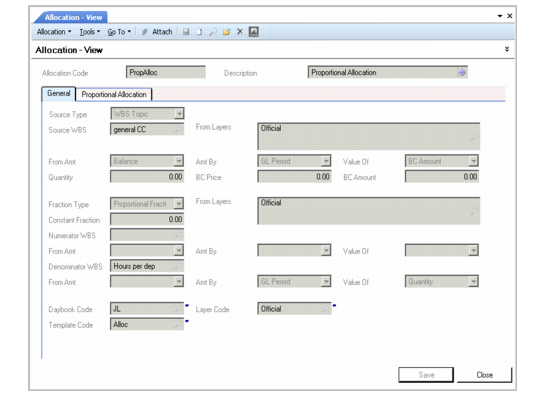
In this example, the source is taken from the budget structure where the machine hour costs are accumulated. The example uses a proportional fraction type. The fractions are calculated using the structure Hours per Department, which totals the machine hours per cost center.
The posting structure is defined by the template Alloc. The target posting is in a transient layer and can be reviewed before final posting.
Allocation Definition
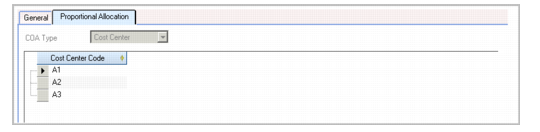
The Proportional Allocation tab displays the list of cost centers for which a proportional fraction must be calculated.
Proportional Allocation Tab
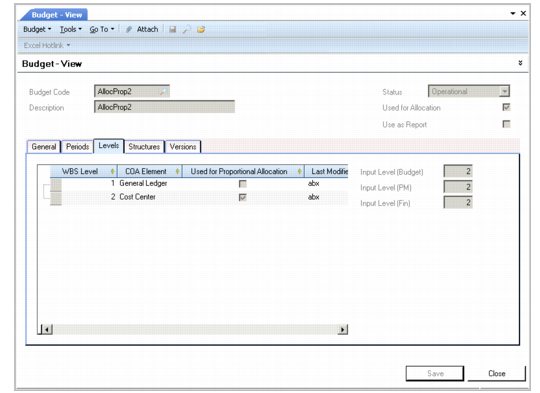
Within the Levels tab in the Budget function (25.5.1.3), the cost center level (level 2) is used for proportional allocation.
Budget View
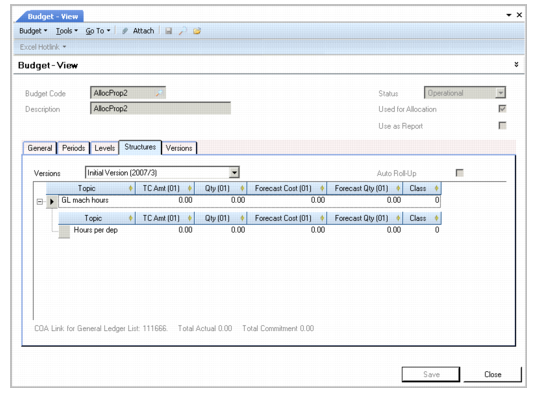
The budget structure on which the allocation is based is defined in the Structures tab in the Budget function. GL account 111666 is linked to the structure.
Budget Modify, Topic Details
You can now run the allocation batch using Allocation Batch Run Execute (25.13.9).
As indicated by the posting template, GL account 666111 is debited with transaction postings for each cost center. A temporary account is credited. The cost center driving the allocation is referenced in each posting line.
Note: The COA level marked as Used for Proportional Allocation in the budget Levels tab must be used within the posting template. The allocation does not run if the system does not find a matching level.
You can view the resulting allocation postings in Journal Entry View (25.13.1.3).