Cross-Company Transactions
Use cross-company accounting features to create balanced transactions between entities in a domain. When transactions or invoices are generated by another entity in the organization, these features let you process the transactions or invoices in your current working entity.
Cross-company transactions use cross-company control accounts to link across entities. Each domain must include a cross-company control account for AR, AP, fixed assets, inventory, and manual journal entry transactions. Cross-company account codes are specified in the Cross-Company tab in Domain Create (36.1.1.1.1). See
Setting Up Domains for more details.
The accounts specified in domain setup are used for every cross-company posting line for each entity in the domain. Each domain in the database uses a different set of cross-company control accounts.
Note: You cannot create cross-company postings in the transient layer, unless the daybook type is Periodic Costing.
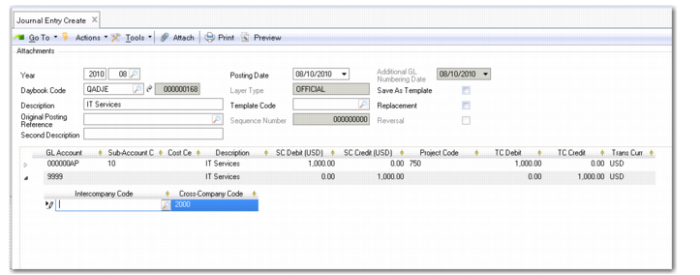
When you enter a cross-company control account on a journal entry posting line, the system recognizes that the transaction is cross-company, and opens a level two posting line, where you enter the code of the other entity in the Cross-Company Code field.
Cross-company posting are of two types: manual and automatic.
Manual Cross-Company Posting
A manual cross-company posting is a two-part process, consisting of a parent and child transaction, each of which you complete separately. The parent and child transactions are posted from within different entities to different daybooks. You can create manual cross-company postings in only the management and the official layers.
The parent transaction is the initial posting that references a cross-company control account.
Example: Entity 1000 and entity 2000 are both subsidiaries of a large organization. Human resource management and IT services for the entire organization are centralized in entity 1000. Cross-company transactions are generated when entity 2000 uses either centralized service.
Entity 1000 uses a journal entries template to record the charges that entity 2000 and other entities in the organization have incurred.
Journal Entry in Entity 1000
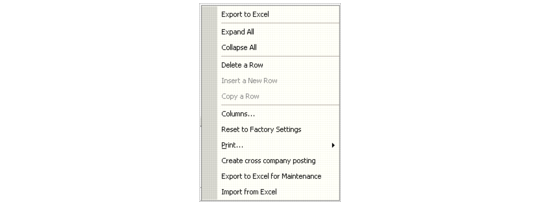
Right-click in the posting grid and select Create cross-company posting.
Right-Click Menu for Cross-Company Posting
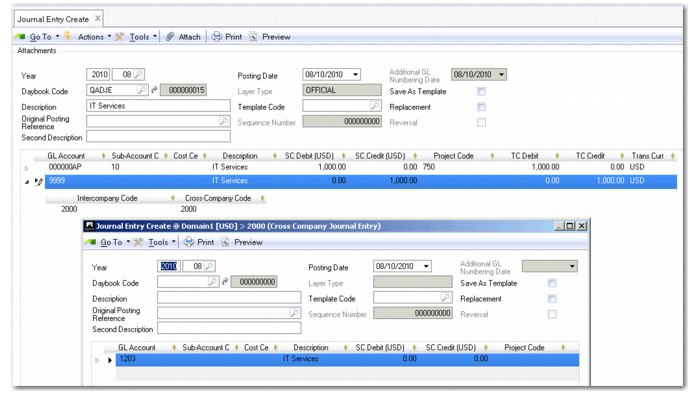
The Journal Entry screen in entity 2000 automatically opens with the corresponding posting for that entity. Complete the posting lines to balance the transaction and click OK to post the child transaction. This action returns you to the parent transaction screen.
The appropriate cross-company account in the target entity 2000 is populated using the definitions in the domain setup, and the intercompany code is stored in the record.
Postings for Entities 1000 and 2000
You are now in the original entity and the transaction is balanced. Click Save to post the parent transaction.
Generate a GL Transactions by Intercompany Code Report (25.15.1.5) and select the parent entity in the criteria to view the posting details. To view details of the child transaction, rerun the report for that entity.
Note: When viewing journal entries for which there are cross-company postings, you can view the cross-company posting by right-clicking the posting line and selecting the Cross Company Posting option.
Automatic Cross-Company Postings
For automatic cross-company transactions, the Cross-Company daemon creates the balancing transaction. You are not prompted to create the child transaction, and the processing occurs in the background.
Automatic postings are processed by the Cross-Company daemon. For more information on system daemons, see
QAD System Administration User Guide.
There are two types of automatic cross-company postings: financial and operational.
Automatic Financial Postings
The automatic cross-company functionality supports activity on:
• Banking entries across multiple domains
• Customer and supplier payment selections across multiple domains
• Open item adjustments across multiple domains
Automatic cross-company postings are possible only for transactions in the official layer. Post the transaction in the source entity using the cross-company control account for the target entity that owns the open item. A request is created for the Cross-Company daemon. The daemon processes the request and creates the posting in the sub-ledger of the target entity.
Automatic Operational Cross-Company Transactions
The system separates cross-company transactions that originate in the operational modules into separate postings for the relevant entities. Each transaction posts entirely within the associated entity, but cross-references the corresponding transaction in the other entity.
All operational cross-company transactions are processed using the cross-company control accounts defined for the domain so that cross-company activity by entity can be tracked easily within the GL.
AR Cross-Company Postings
Cross-company postings are generated by Invoice Post and Print (7.13.4) when one or more lines on a sales order are shipped from a site with an entity other than the sales order header entity. In this case, the sales amount associated with the line is posted to the shipment entity, but the AR amounts are posted to the header entity.
Invoice Post and Print creates both a customer invoice and GL transactions. However, when a transaction spans more than one entity, it includes information on the appropriate cross-company AR accounts so that the correct GL transaction is created. This single transaction is split into two separate transactions when posted.
For cross-company invoices, the operational transaction is split as described in the following example.
A sales order is created for header site 1000, associated with entity A. It has one line item priced at $50, which is shipped from site 2000, associated with entity B.
When this invoice is posted, the system debits the customer control account for $50 using a Customer Invoice daybook and credits the cross-company AR account for entity A for $50 using entity B’s intercompany code.
The system retrieves the cross-company AR account to use from the domain setup. It uses the intercompany daybook from the relevant daybook set for the posting.
A corresponding set of entries is made for entity B. The system debits cross-company AR $50 using entity A’s intercompany code and credits the sales account $50 using a Journal Entries daybook.
AP Cross-Company Postings
Cross-company postings can be created during purchase order receipts when a line item on a purchase order is received at a different site than the one on the order header. These transactions are managed through operational transaction postings.
A different kind of cross-company posting can occur when one entity pays the invoices for goods received at another site. These postings are created during receiver matching and handled by the Cross-Company daemon. The value of the PO Expensed Item Receipts amount—for non-inventory items—or PO Receipts amount—for inventory items—associated with the line is transferred to the AP payment entity.
Inventory Cross-Company Postings
Cross-company postings occur when inventory is transferred from one site to another site associated with a different entity. The value of the inventory is transferred to the receiving entity, using Cross-Company Inventory and Transfer Variance accounts as clearing accounts.
Note: The Transfer Variance account is used to record differences in the cost of items at different sites. The following example assumes the costs are the same at both sites, and the posting is not shown.
A user creates an inventory transfer for items valued at $2000 from site 10 in entity Y and site 20 in entity Z. The system:
• Credits the Inventory account for entity Y for $2000
• Debits the Cross-Company Inventory account of the current domain for $2000, referencing the intercompany code of entity Z
• Credits the cross-company inventory account of the current domain for $2000, referencing the intercompany code of entity Y
• Debits the Inventory account of entity Z $2000
Cross-Company Fixed Assets Transactions
Cross-company postings in Fixed Assets can occur when an asset is transferred between entities. The value of both the asset cost and the accumulated depreciation is transferred to the receiving entity with balancing entries made to the Cross-Company Fixed Asset account, using the intercompany codes of the two entities. See
QAD Fixed Assets User Guide for details on Fixed Assets.