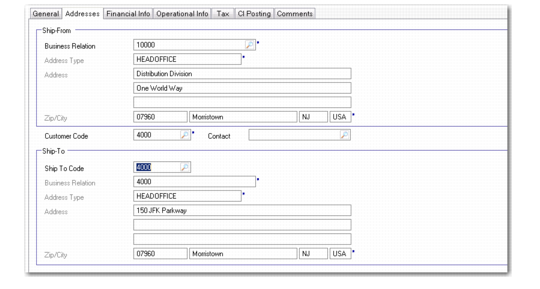
Addresses Tab
Use the Addresses tab to specify the ship-from address—the address that identifies one of your inventory sites—and the customer ship-to address. The address on the General tab is the bill-to address for the invoice.
All fields in this tab display read-only information for sales-related invoices, except for Sold-To Customer Code.
Customer Invoice Create, Addresses Tab
Ship-From Business Relation
Enter the code that identifies the business relation associated with the site where items being invoiced are shipped from. If this is a miscellaneous invoice or credit note, the ship-from site is still required.
The default for a new invoice is the business relation associated with company address defined for the bill-to customer site. This site is specified in Customer Data Maintenance (2.1.1).
Customer Code
Enter the code identifying the sold-to customer who received the items being invoiced. On a new manually created invoice, the code entered for the Customer on the General tab displays by default. The sold-to address displays on the printed invoice.
Contact
Specify a contact name for the customer. The lookup displays the contact details defined for the customer’s business relation.
Ship-To Code
Enter the code that identifies the address receiving the items being invoiced.
This field defaults from the sold-to address; you can change it to another valid ship-to defined for the business relation in Customer Ship-To Create.
The system uses the tax detail for the ship-from and ship-to addresses to select the correct tax environment for tax calculation.
• For the ship-from, this is the headoffice address of the business relation.
• For the ship-to, the tax details defined for the customer record are used.