Financial Info Tab
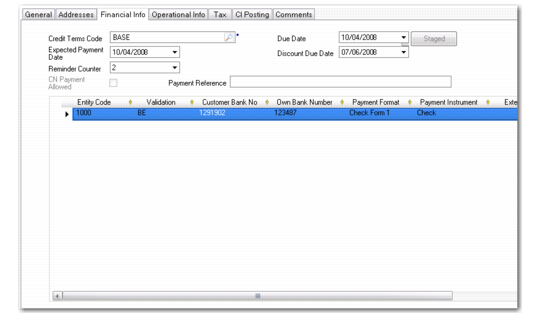
Use the Financial Info tab to define credit terms and to view the banking and payment details for this customer. All of the fields for this tab display predefined information for sales-related invoices and can be modified.
Customer Invoice Create, Financial Info Tab
Field Descriptions
Credit Terms Code
Specify the credit terms that apply to this invoice. Credit terms determine invoice due dates and any settlement discounts on early payments. Credit terms also determine if multiple payments are made in stages based on invoice percentages.
When the credit terms code is changed, the invoice due date is recalculated.
Credit terms default from the customer record. Credit terms for sales-related invoices default from the associated sales order.
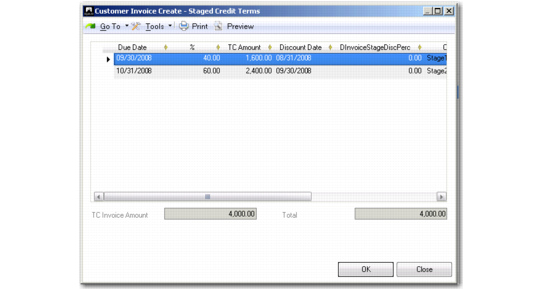
When you specify a credit terms code that has been defined with stages, you can view and update the staged terms by clicking Staged. You can modify the percentage allocation of the terms or make other changes as needed.
Customer Invoice Create, Staged Credit Terms
Due Date and Discount Due Date
These fields display the date when payment is due and the last date a discount applies, calculated by the system based on the credit terms and the invoice date. You can modify the due dates without affecting the credit terms.
Note: If the credit terms have a base date specified, this is used in the due date calculations rather than the invoice creation date.
Expected Payment Date
Specify the date when payment is expected to be received. The expected payment date is used in cash flow reporting.
Reminder Counter
This field displays the reminder level that applies to this invoice.
Payment Reference
Optionally specify a reference number to identify a customer payment for this invoice. If the payment format is of type Single Euro Payments Area (SEPA), leave this field blank. When you click Save, the field is then automatically populated with a valid system-generated SEPA payment reference number. However, if you enter a reference and then click Save, no SEPA payment reference number is generated and assigned to this invoice. When SEPA messages are turned on at entity level, a warning message is displayed before you are allowed to continue the Save operation.
For any entity outside SEPA, you can enter a reference such as a Transfer with Structured Message (TSM) number. The TSM is a standard reference numbering system for electronic transfers, used by many banks.
The grid displays the default banking and payment details configured for this customer. The default customer bank account details are displayed in the first line of the grid.
Note: If a customer pays directly with cash or transfer, a customer bank is not required. You can create invoices for the customer without defining banks and recording payments for the invoices in Banking Entry Create (31.1.1). However, if your customer uses other payment instruments and you want to use any customer payment features, such as recording customer checks, a customer bank must be specified.
If you have configured multiple bank accounts for this customer, you can add these account details by inserting a new row for each account. This lets you split the invoice amount over several accounts.
Validation
This field displays the bank format validation code for the customer bank account. Account number validation ensures that the account number is formatted according to the regulations of the national banking system. See
Define Bank Account Formats.
Customer Bank Number
Select the customer bank account number from the accounts specified for the customer record. If you have defined a default bank for the customer, it is displayed here. If other accounts are defined for the customer, you can insert a new account as a new line in the grid.
Own Bank Number
This field displays the own company bank account number where payments from this customer are received. This number is defined on the customer record, and is normally the default bank account number for the entity you are currently working in.
Payment Format
Each bank account defined for the customer has an associated payment format. Additionally, for some payment formats, you can define multiple attributes for each format, and can modify attribute values of the format. See
Payment Formats for a description of payment formats.
Payment Instrument
This field displays the payment instrument defined as part of the payment format for payments from this customer bank to your company bank account.
Extension
This optional field displays the bank number extension. The extension defines the currency when an account has amounts in multiple currencies.
For example, if you have a single bank account with separate accounts defined for US dollars, euro, and yen, define a bank extension for each currency.
TC Payment Amount
This field displays the payment amount in the transaction currency.
The sum of the TC payment amounts for all bank accounts specified on the invoice must equal the invoice total.
Business Relation Code
This field displays the business relation for the customer’s bank, and contains bank addressing information.
SWIFT Code
This field displays the SWIFT code of the bank, if any. SWIFT (the Society for Worldwide Interbank Financial Telecommunication) is a banking network for world-wide payments between banks. Also known as the BIC or Bank Identifier Code.
Formatted Bank Number
This field displays the customer bank account number, formatted according to the validation logic you applied. See
Define Bank Account Formats.
Bank GL Account
This field displays the account code of the bank account linked to the own bank account and payment format combination.
Last Modified User/Date and Time
These read-only fields display the ID of the user who last updated this record and the date and time of update.