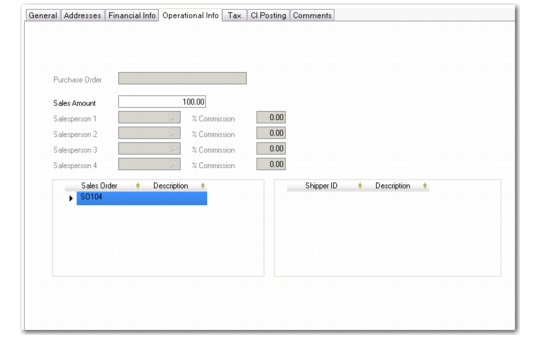
Operational Info Tab
The Operational Info tab displays data for sales-related invoices only. In this case, details about the originating sales order are displayed for reference. For a sales-related invoice, only the Sales Amount—used for calculating commission—can be modified. For a manually created invoice, you can specify a PO number, sales amount, and salespersons.
Customer Invoice Create, Operational Info Tab
Field Descriptions
Purchase Order
If a purchase order number was recorded on the original sales order, it displays in this field. This number indicates the original number of the document that initiated the sale, and can be useful when communicating with the customer.
Sales Amount
Specify the amount for which the salespersons should receive commission credit. This is normally the invoice total minus any non-commissioned charges such as freight or tax. This defaults from the order and is the only field that can be modified in this tab.
Salesperson 1–4
This field displays the salespersons specified on the order to receive commission and quota credit for the order. The commission percentage defaults from the salesperson record.
Salesperson Commission
This field displays the commission percentage each salesperson receives. For invoices posted from sales orders, this amount defaults from the associated sales order. For manually created invoices, commission defaults from Salesperson Commission Detail, if rates have been defined for the customer; otherwise, from the salesperson record.
Sales Order Grid
This field displays the sales orders that are associated with this invoice. If consolidated invoicing was used during Invoice Post and Print, more than one order can display. The Description field displays any text entered in the Remarks field on the sales order header.
Shipper ID Grid
This field displays the IDs of any shippers associated with the invoice.