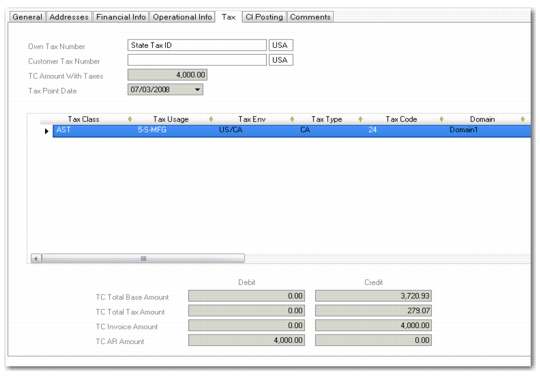
Tax Tab
When the invoice is taxable, the system calculates tax information and displays it on the Tax tab. This information is read-only for sales-related invoices, and reflects the tax amounts generated based on the order tax details.
Customer Invoice Create, Tax Tab
Field Descriptions
Own Tax Number
This field displays the state tax ID of the Ship-From business relation, which is associated with the current entity and displayed on the Addresses tab.
TC Amount with Taxes
When the Taxable field is selected, the invoice is subject to tax. This field displays the total of the invoice amount in transaction currency plus the applied tax.
Customer Tax Number
This field displays the state tax ID of the Bill-To customer, which is displayed on the General tab. If no customer bill-to is defined, the state tax ID of the ship-to customer is displayed.
Tax Point Date
This field displays the date to be used in tax calculations, which by default is the same as the posting date. For sales-related invoices, this field displays the tax calculation date on the associated order.
Tax Grid
Tax Class, Tax Usage, Tax Environment, Tax Code, Tax Type.
For a new invoice, these fields default from the tax definitions for the bill-to customer and determine the tax calculation amounts. For an invoice posted from a sales order, tax details default from the order.
The default tax environment is calculated using the tax zone of the ship-to site, the tax zone of the supplier’s address, and the tax class of the supplier or PO, if linked.
You can overwrite the default tax environment, tax class, tax usage, and tax codes to select new values. If you modify any of these fields, the system resets the TC Base Amount (Cr) field to zero, and a new tax rate can be applied.
Instead of modifying the default tax details, you can also insert a new tax row, enter the new tax details, and delete the original default tax row.
To recalculate the tax amounts after modifying default details or after entering tax details in a new tax row, re-enter the invoice amount before tax in the TC Base Amount (Cr) field.
Domain
This field displays the current domain.
TC Base Amount DR
This field displays the debit base amount in the transaction currency. This is calculated by the system using the total invoice amount (TC) and the applicable tax rate code.
TC Base Amount CR
This field displays the credit base amount in the transaction currency. This is calculated by the system using the total invoice amount (TC) and the applicable tax rate code.
TC Tax Amount DR
This field displays the debit tax amount (TC) calculated by the system using the total invoice amount (TC) and the applicable tax rate code.
If the Update Tax Allowed field is selected in Tax Rate Maintenance (29.4.1) for the tax rate used, you can modify this field.
TC Tax Amount CR
This field displays the credit tax amount (TC) calculated by the system using the total invoice amount (TC) and the applicable tax rate code.
If the Update Tax Allowed field is selected in Tax Rate Maintenance for the tax rate used, you can modify this field.
Recalc
When you change the tax class, tax usage, tax environment, or the Taxable fields, or modify one of the base amounts, this field is automatically selected, and the system recalculates the amounts when you have completed the line in the grid. You can also manually select or deselect this field
Update Tax Allowed
When this field is selected, you can modify the base and tax credit and debit amounts during transaction entry. The changes you make are displayed in the CI Posting tab. This field is set in the tax rate. This feature is useful for overriding the system if there is a need to match amounts on manually issued documents. In some environments, tax authorities require that you cannot modify the calculated tax amounts.
Suspended Tax
When selected, this field indicates that the taxes on this invoice are suspended. Suspended taxes are enabled for invoices through the customer tax setup. See
Suspended Tax on Customer Invoices.
Last Modified Date/Time and User
These read-only fields display the ID of the user who last updated this record and the date and time of update.
Summary Information
TC Total Base Amount
This field displays the sum of the base amounts—debit or credit—of all the tax detail lines in transaction currency.
TC Total Tax Amount
This field displays the sum of the tax amounts—debit or credit—of all the tax detail lines in transaction currency.
TC Total Amount
This field displays the sum of the total base amount and the total tax amount—debit or credit—in transaction currency.
TC Invoice Amount
This field displays the total invoice amount—debit or credit—as entered on the General tab in transaction currency.