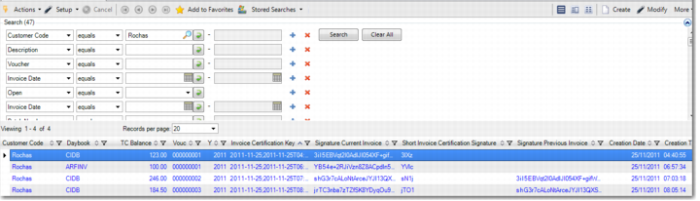
Viewing the Signatures
You can view the invoice signatures when you browse for invoices in Customer Invoice Modify or Customer Invoice View. Several fields relate to invoice certification.
Customer Modify, Browse
Invoice Certification Key
This field displays the key invoice data that was used to generate the signature in a readable format. The data includes the invoice date, creation date and time, full invoice number, and amount.
Invoice Certificate
This field displays QAD’s certification number, as issued by the local government.
Signature Current Invoice
This field displays the signature for the invoice, which is a string containing 172 characters.
Signature Previous Invoice
This field displays the signature of the previous invoice created using the same daybook.
Creation Date
This field displays the date on which the invoice signature was created.
Creation Time
This field displays the time at which the invoice signature was created.
Short Invoice Certification Signature
This field displays the short signature for the invoice, which consists of four characters from the signature corresponding to the 1st, 11th, 21st, and 31st positions.