Payment Processing Examples
This section illustrates how you can combine payment statuses to create different kinds of payment processing scenarios.
Direct Payment by Check
In a very simple scenario, you can receive payments by check and record payments that directly update the GL. Then, if the payment fails, an additional step to back out the update is required.
Note: While it is possible to set the initial status to Paid, this approach is not recommended since reversing the payment requires extra work.
The recommended approach is to have at least one customer control account for the For Collection status.
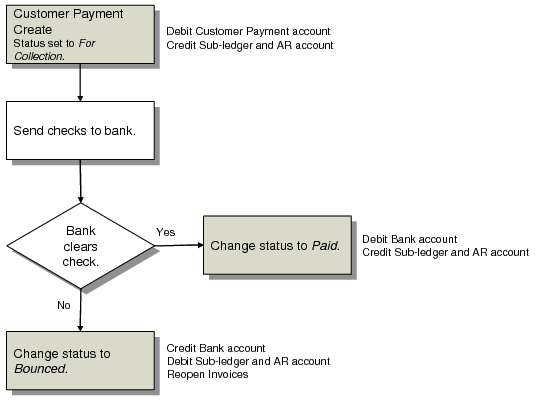
The following diagram illustrates that scenario.
Simple Customer Payment by Check
This payment flow uses three status codes:
• When the payment is created, the For Collection status debits the Customer Payment account and credits the customer’s AR account.
• When notification is received that the bank has cleared the check, the status is changed to Paid. The bank account is debited and the For Collection Customer Payment account is credited.
• If the check fails to clear, changing the status to Bounced reverses the effects of the For Collection status.
Staged Payment by Check
To avoid fluctuation in your bank account balance when receipt of payment is more uncertain, you can use one or more customer payment accounts to manage the payment. This process provides more control, but also generates more GL transactions within the system.
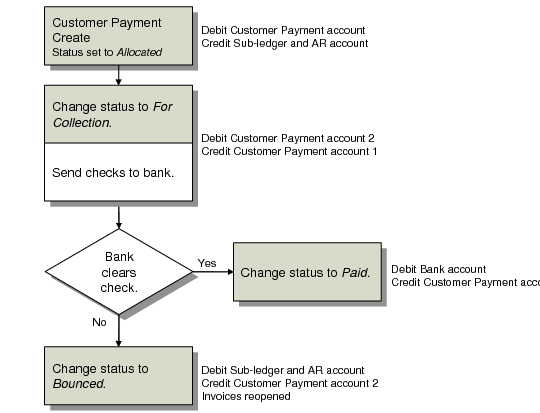
The following diagram illustrates using two additional statuses and corresponding customer payment accounts.
Staged Customer Payment by Check
This payment flow uses four status codes:
• When the payment is created, the status Allocated debits a customer payment account and credits the customer’s AR account.
• If you change the status to For Collection when the payment documents are sent to the bank, the system debits the second customer payments account, and credits the first one.
• When notification is received that the bank has cleared the check, the status is changed to Paid. This debits your bank account and clears the second customer payment account.
• If the check fails to clear, changing the status to Bounced reverses the effects of the Allocated status.
Customer Direct Debit
Direct debit is managed by using the Create Payment Selection activity, which groups payments based on due date and generates an electronic file to be sent to the customer bank.
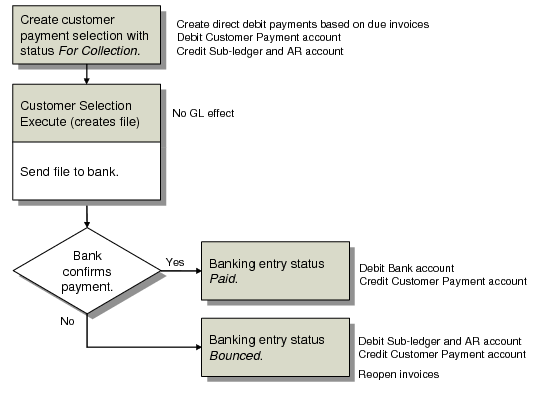
The following diagram illustrates this process.
Customer Direct Debit
This payment flow uses four status codes:
1 Create payments with the status For Collection, which debits a customer payment account and credits the customer’s AR account.
2 Generate an electronic file to be sent to the bank. This has no GL effect.
3 When the bank confirms that payment has cleared, the payment status is changed to Paid, debiting your bank account and clearing the customer payment account.
4 If the payment fails to clear at the bank, changing the status to Bounced reverses the effects of the For Collection status.
Payment with Company-Initiated Drafts
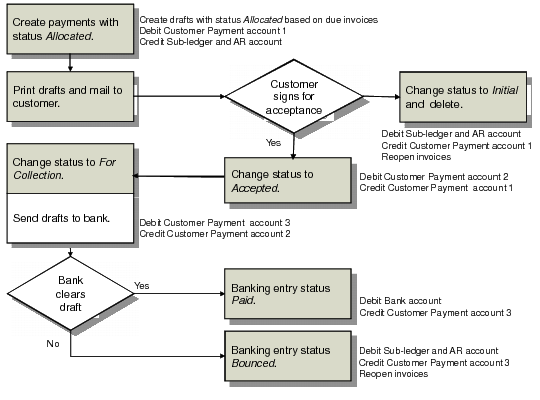
Managing payment with drafts requires more statuses, since the draft is subject to approval by the customer. The following diagram illustrates the process for drafts that you initiate and send to the customer.
Customer Payment with Drafts
1 When the payment is created, the Allocated status debits a customer payment account and credits the customer’s AR account.
2 The draft is printed and sent to the customer. What happens next depends on whether the customer approves the draft:
a If the draft is not accepted, the status is changed to Initial and the GL effects of the first step reversed.
b If the draft is accepted, the status is changed to Accepted. This moves the amount from one customer payment account to another.
3 The draft is then sent to the bank. Changing the status to For Collection debits a third customer payment account.
4 The action of the bank determines the next status transition:
a If the bank clears the draft, the status is changed to Paid. This debits your bank account and clears the customer payment account.
b If the draft fails to clear, changing the status to Bounced reverses the AR credit and clears the customer payment 3 account.
Conditional Payment of Discounted Drafts
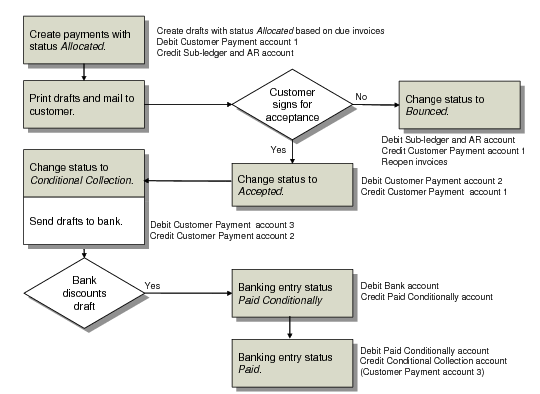
When you present a draft to the bank for collection, you may request payment of the draft before the draft due date has elapsed. The following figure illustrates the discounting flow.
Payment of Discounted Drafts
The first two steps are the same as the flow for payment of drafts.
1 When the payment is created, the Allocated status debits a customer payment account and credits the customer’s AR account.
2 The draft is printed and sent to the customer. What happens next depends on whether the customer approves the draft:
a If the draft is not accepted, the status is changed to Bounced and the GL effects of the first step reversed.
b If the draft is accepted, the status is changed to Accepted. This moves the amount from one customer payment account to another.
3 The bank honors the draft and charges a fee for early payment, based on a percentage of the draft value. In this case, the payment is considered conditional since you are still liable for the full amount and is posted as a liability on your accounts. Instead of changing the payment status to For Collection when you are ready to present the payment to the bank, you use the Conditional Collection status when you request early payment from the bank. This process is also called discounting a draft.
4 When you create a banking entry to confirm the payment, the system sets the payment status to Paid Conditionally. This debits the Bank account and credits a Liability account that you define for the Paid Conditionally status.
This posting reflects the fact that you received the money (DR on bank account), that the amount is still liable (CR on liability account), and that this liability is balanced (DR on customer payment account). Generally, the bank gives a smaller amount (DR) than the nominal value of the payment document (CR). Therefore, in the banking entry, there is a debit amount remaining that you must post to a GL account for discounting drafts.
5 Finally, you use Customer Payment Status Change to change the payment status from Paid Conditionally to Paid, which backs the payment amount out from the customer payment and liability accounts into a discounted account (which you define when creating the Paid status). This leaves a Debit balance on your Bank account.