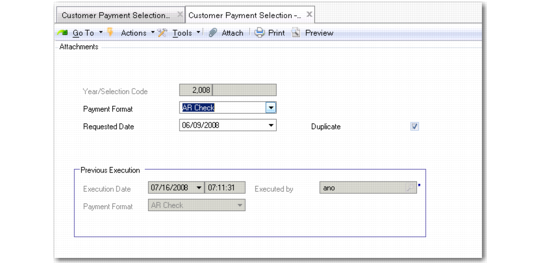
Customer Payment Selection Execute
Use the Customer Payment Selection Execute (27.6.6.1) and Re-execute (27.6.6.2) activities to generate a payment file from the payment selection you created.
The Execute activity dates and numbers the payment file. This payment file is then available for a banking entry. Use the search criteria to retrieve existing payment selections.
The system uses data loaded into EDI eCommerce to create the file to be sent to the bank. Details about the payment file such as its location on the file system are specified when the electronic data interchange (EDI) data is loaded. The EDI processing is controlled by the payment format and attribute values. In this way, electronic files for export are correctly formatted for the receiving bank. This process is described in detail in
Payment Formats.
Customer Payment Selection Execute
Field Descriptions
Year/Selection Code
This read-only field displays the year and the customer payment selection code.
Payment Format
This field displays the payment format used when creating the payment selection.
Requested Date
Specify a payment date for the payments included in the file.
Duplicate
Select to indicate that this file is a duplicate of a previously generated payment file.
If the current file is a duplicate, the fields in the Previous Export area display details of the previously generated file.
Payments and Banking Entries
Use the Payment Selection Allocation option in Banking Entry Create to complete the processing of payment selections.
For more details on banking entries, see
Banking Entry.