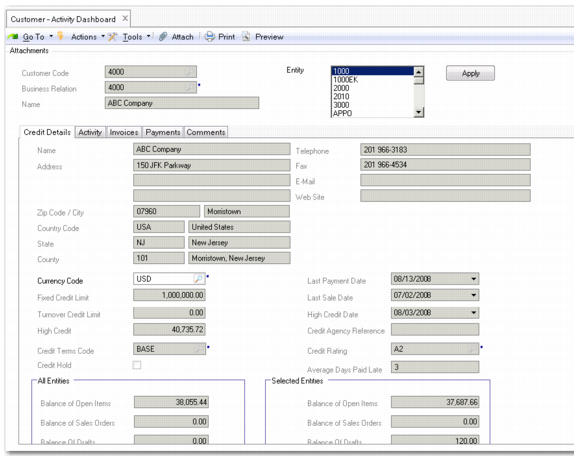
Customer Activity Dashboard
The Customer Activity Dashboard (27.18.1) offers a comprehensive overview of all activity related to a single customer, in a single entity or over multiple entities. The drill-down generates read-only credit information that includes the following areas:
• Sales order and open item balances
• Total current liability
• Individual drill-downs on invoices, credit notes, and open item adjustments
You can display credit information for a customer with reference to one or multiple entities in the domain and see the balance for the selected entities and all entities. Amounts in the payment and invoice grids are displayed to two decimal places and discount calculations support negative quantities.
The Activity tab displays all invoices and associated payments for the customer, by default for a three-month period. Payments display as child rows beneath their associated invoices. You can view the invoice and payment information separately using the Invoice and Payment tabs. Payments displayed include invoices allocated through banking entries.
You can use grid features to group and sort information by key credit-related details such as the number of weeks overdue, or see all invoices due in a certain week.
Customer Activity Dashboard
Field Descriptions
Customer Code
This field displays the name of the customer that you selected previously in the browse for which you want credit information. The associated business relation name and code display.
Business Relation/Name
These fields display the associated business relation and name.
Entity
Select one or multiple entities for which to display AR activity for this customer. The current entity is selected by default, and totals for the current entity display in the Credit Details tab. Use Ctrl+Click to select multiple entities in the list.
If you change the entity settings, click Apply to regenerate the credit information. The entity setting affects data in all the tabs.