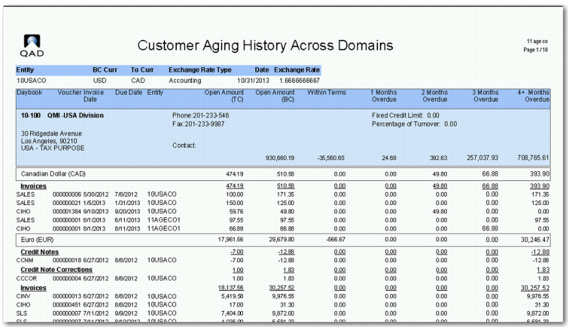
Customer Aging History Across Domains Report
When you are responsible for cash collection over many domains, use Customer Aging History Across Domains (27.17.21) to create a report that shows the open balances over multiple selected entities from multiple domains with the same customer shared set.
The Customer Aging History Across Domains report is very similar to the Customer Aging Analysis History report. The differences are:
• The Entity field can only contain one selected entity. Multiple entities can be selected by inserting additional Entity selection fields using the + sign on the selection page.
• The Type for Aging Calculate enables you to calculate the age of the invoice based on the Invoice Due Date or the Invoice Date. When the field is blank, aging is based on the invoice due date.
• The Summary Info By search field does not contain Cost Center or Sub Account.
The header section of the report contains the exchange rates used to translate the base currency amounts of the selected entities to the base currency of the current workspace entity. When all entities have the same base currency, this section is not displayed. The report also has a column with the entity of the invoice.
Customer Aging History Across Domains Report