Preparing to Use Self‑Billing
AR Self-Billing uses processed shipping information to match incoming customer-initiated payments. The system must first process shipping information for the incoming remittance.
Shipment details are captured at the time a shipper is confirmed. Invoice, tax, order-level discount, and trailer information is captured at the time of invoice posting.
Note: The Sales Order Shipment program does not capture self-billing information.
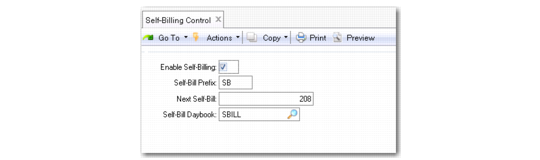
You activate Self-Billing for the system using Self-Billing Control (27.6.12.24).
Self-Billing Control (27.6.12.24)
Set the following parameters:
Enable Self Billing
Select to enable self-billing in the system.
Self-Bill Prefix
Define the three-character, self-bill numbering prefix according to your requirements. In cases where the customer supplies the remittance prefix and number, you can choose to leave this field blank.
Next Self-Bill
Enter the next self-bill number (maximum 20 characters). In cases where the customer supplies the remittance number, you can choose to leave this field blank.
Self-Bill Daybook
Select a daybook to use for self-billing transactions. You must define at least one self-billing daybook in the system.