Maintaining Self-Bills
Once a customer remittance advice has been entered into your database, it must be maintained and updated.
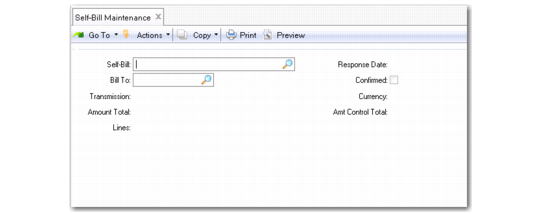
Use Self-Bill Maintenance (27.6.12.1) to manually enter new self-bills and delete and maintain existing self-bills. Use this function also to reconcile any adjustment lines that result from processing a self-bill using Self-Bill Auto Create (27.6.12.4) or Document Import (35.1).
Self-Bill Maintenance (27.6.12.1)
Self-Bill
Enter the self-bill to which the selections are to be added. When left blank the system generates a self-bill number.
By entering an existing self-bill number, you specify a self-bill to which selected details are added. Specifying any other number in this field creates a self-bill for that number and adds the selection to it.
Bill-To
Enter the bill-to for which the selection is to be made. The bill-to is required. You cannot change the bill-to once you have created a self-bill in the system.
All shipments referenced on the shipper must be paid by the same Bill-To and with the same currency.
Transmission
Enter the transmission that identifies the batch of EDI self-bills received from this customer.
This field is used to group a number of EDI self-bills.
Amount Total
This field displays a running total amount of all shipments and other entries referenced on this self-bill. This total is maintained by the system and cannot be changed.
Lines
This field displays the running total number of lines on this self-bill. This system-maintained field is for reference only and cannot be edited.
Response Date
Enter the date by which you need to communicate any discrepancies found within the self-bill back to your customer.
This is a previously agreed-upon date between you and your customers. It defaults to the current date.
Currency
Enter the currency for this self-bill document. All records included on this self-bill must be invoiced using this currency. For new self-bills, currency defaults from the bill-to address of the customer.
Note: Total is expressed in terms of the currency specified for this customer.
Amt Control Total
Enter the control total of all shipments and other entries referenced on the self-bill. This control total is usually the total on the hard-copy self‑bill.
This total is used to reconcile the total amount of the self-bill. In order to make a payment for a self-bill, the Amt Control Total must match the Amt Total of the self-bill.
If any entries on the self-bill are incorrectly entered, the amount does not match the self-bill Amount Total. You are warned about the discrepancy when exiting this maintenance function. The two totals must match to apply payment to the self-bill.