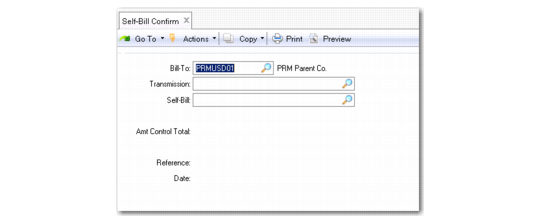
Using Self-Bill Confirm
When you use Self-Bill Confirm (27.6.12.7) to confirm the self-bill, the system does not immediately complete the payment process. Instead, it updates the self-bill lines, settles the original invoice amounts created when the shipper was confirmed, and creates an open item for the final amount, which is then paid automatically (if configured for the customer) or manually using a process such as banking entry. It also creates prepayments in the form of AR open items for any discrepancies. You can write these discrepancies off at a later stage.
Before you can execute Self-Bill Confirm successfully, you must ensure that the Amount Total that displays in the header of Self-Bill Maintenance and the Amt Control Total for that self-bill are the same.
Self-Bill Confirm (27.6.12.7)
To confirm self-bills:
1 Enter the customer bill-to address.
2 Enter the transmission or self-bill number.
The Amt Control Total and other customer financial information are displayed.
3 Optionally enter the associated reference or dates.
4 You are prompted to continue with the confirmation. Choose Yes and then Next to continue.
Note: Choosing No returns you to the program header without updating any information.
When you write off a discrepancy:
1 Create a debit/credit invoice in Customer Invoice Create (27.1) for the write-off amount.
2 Create an adjustment line for the amount.
3 Enter the debt/credit invoice in the Invoice field on the detail line for the adjustment.