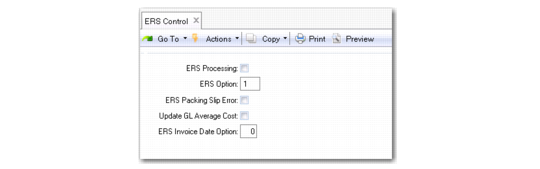
Set Up ERS Control
Use the fields in ERS Control (28.10.24) to activate and deactivate ERS processing, and to set options that affect ERS processing.
ERS Control
ERS Processing
Select the field to activate ERS.
If you select this field, a pop-up window containing ERS processing options opens when you create a purchase order header and for each order line in Purchase Order Maintenance, Blanket Order Maintenance, and Supplier Scheduled Order Maintenance.
If you clear this field, ERS is deactivated.
If you select this field, you are prompted to run ERS Conversion. Answer Yes to run the ERS conversion utility. The ERS conversion utility must run and complete successfully for this field to remain selected. If the ERS conversion utility is not run or does not complete successfully, the field is cleared.
ERS Option
Specify the default value for the ERS Option field that displays in the Purchase Order, Blanket Order, or Supplier Scheduled Order Maintenance header.
The order header value, in turn, determines how defaults are set for each line on the order. Valid values for the header ERS Option are:
Blank: The system determines the default ERS option for the line using settings in ERS Maintenance.
0: The ERS option for the line defaults to 0. When the ERS option for a line is set to 0, the system determines the ERS option when you run the ERS Processor, and uses the most current value from ERS Maintenance.
1: The ERS option for the line defaults to 1, and ERS processing is disabled for that order line.
If the ERS Option is blank on a purchase order header, the system determines the line value by looking for a corresponding ERS Maintenance record.
ERS Packing Slip Error
Specify the action that ERS should take when processing receivers that have a blank packing slip number.
If you select this field, ERS does not create a supplier invoice and receiver matching record for a receiver with a missing packing slip number. The ERS Processor prints an error for all lines on a Purchase Order eligible for ERS processing where the packing slip is blank.
If you clear the field, ERS processes receivers with blank packing slip numbers. In these cases, ERS creates a supplier invoice with the receiver ID as the invoice reference number.
Important: It is recommended to set up a manual procedure in your receiving department for recording the packing slip if the ERS Packing Slip Error field is selected and you are using ERS processing. Otherwise, the system generates many error lines when the ERS Processor is run. You can correct the errors manually by entering a supplier invoice for the PO or by reversing the receipt entered and receiving the product with a packing slip.
Update GL Average Cost
Specify how ERS should process supplier invoices in an average costing environment.
Select the field if you want ERS to update the item cost at processing time.
Clear the field if you do not want ERS to update the item cost.
During receiver matching where average costing is used, you can update the cost of an item.
ERS Invoice Date Option
Specify how ERS calculates the supplier invoice date.
0 (zero): Use the receipt date of the receiver as the supplier invoice date.
1: Use the shipment date of the receiver as the supplier invoice date.