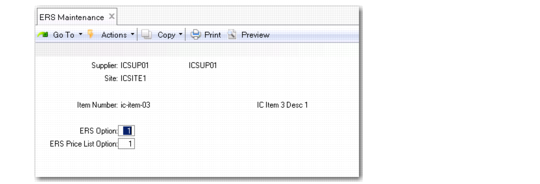
Set Up ERS for Suppliers, Sites, and Items
You can use ERS Maintenance to set the default ERS processing options for a PO line, which determine:
• Whether to process the line using ERS
• When applicable, whether ERS should generate confirmed or initial invoices for the line
The ERS Processor searches ERS Maintenance for default settings for the supplier, site, and item combination associated with a PO line to determine how it should process the line. You can define default settings in ERS Maintenance for a particular supplier, site, item number, or any combination of these, such as:
• Supplier, site, and item
• Supplier and site
• Supplier and item
• Supplier
• Site
When determining the ERS option for a PO line, the system looks for a corresponding ERS Maintenance record or combination of ERS Maintenance records, in the following order:
• Supplier/site/item record
• Supplier/site record
• Supplier/item record and a separate site record
• Supplier record and a separate site record
The system sets the default ERS option for the line based on the first ERS maintenance record or combination of records that it finds. When a combination of records with different ERS options is found, the system sets the ERS option to the lowest value in the combination. If no records or record combinations are found, the system sets the ERS option to 1, disallowing ERS processing for that line.
When the Fixed Price field is set to No on a PO line, the ERS Processor automatically updates the purchase price on that line based on the ERS Price List Option setting for the line.
Note: When Fixed Price is Yes on a PO, the ERS Processor uses the purchase prices recorded on the order and does not attempt to reset them, regardless of how ERS Price List Option is set.
ERS Maintenance (28.10.1)
Supplier
Specify a supplier for which to define default ERS settings.
You can then set ERS processing options for the supplier alone, for the supplier and site combination, or for a supplier, site, and item combination.
The Supplier field is optional. However, if the Supplier field is blank, you must specify a value in the Site field.
Site
Specify a site for which you want to set default ERS processing options. This field is optional. However, if you do not specify a site, you must enter a value in the Supplier field.
You can set ERS processing options for the site alone, for a supplier and site combination, or for a supplier, site, and item combination.
Item Number
Enter an item to make the ERS processing options specific to this supplier and item, or to a supplier, site, and item combination.
When the system determines the default ERS Option and ERS Price List Option for purchase order or scheduled order lines, it first checks if ERS Maintenance contains a default value for the supplier, site, or item combination.
ERS Option
Specify whether the ERS Processor should create supplier invoices and receiver matching for purchase order lines with the supplier, site, and item combination, and if created, whether to create initial or confirmed invoices.
The options are:
1: Disallow ERS processing for the combination specified.
2: Create an initial invoice and receiver matching record for pending invoices with the specified combination of supplier, site, and item. This option adds a degree of security because the invoice created must be approved using a separate process.
3: Create a confirmed supplier invoice and receiver matching record for receipts with the specified combination of supplier, site, and item.
Note: When ERS Conversion is run, it sets this field for each supplier and site in the current domain.
ERS Price List Option
When using PO price lists, specify the effective date the ERS Processor should use when retrieving the relevant price list.
The options are:
1: Use the receipt date.
2: Use the ship date.
3: Use the order date, which varies by the order type.
• For individual purchase orders, the order date is used.
• For blanket orders, the order date of release is used.
• For scheduled orders, the order date on the main order is used.
Note: The ERS Processor uses the ERS Price List Option field if a price list is specified for the order, and if the Fixed Price field on the order line is set to No.