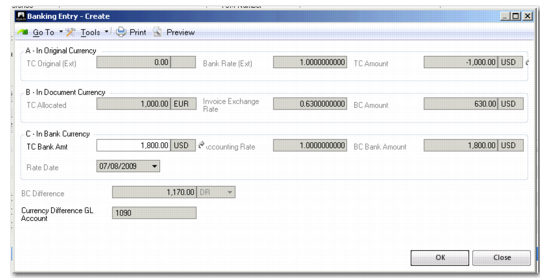
Currency Details
When allocating to an invoice or payment, you have the option to view and modify currency details for foreign currency transactions. Select the Currency Details option by right-clicking an invoice or payment line. The system manages allocations for both simple and complex currency and exchange rate combinations. Exchange rate differences are automatically posted to exchange rate gain and loss accounts.
The Currency Details window is particularly useful when the bank account is defined in a different currency than the currency of the invoice or payment to which the banking entry is allocated. In this case, the exchange rate applied by the bank may not exactly match the rates recorded in Exchange Rate Create, and you can update the values in the Bank Currency section of the window to reflect this.
Banking Entry Allocate, Currency Details
The system processes the exchange rate differences and generates the related postings.
In the Original, Document, and Bank Currency columns, you can enter amounts and exchange rate information.
Original Values
The Original Currency fields are copied from the Value Details window that is available on Banking Entry Create.
TC Original (Ext)
The value in the currency used by the business relation to pay the bank; this is not the original open item currency amount. This amount is usually in the same currency as the invoice being paid
Bank Rate (Ext)
The bank converts the TC Original (Ext) amount to the currency of the bank account to which the payment was made.
TC Amount
The original amount converted to the bank account currency.
The Payment Currency is the open item (invoice or credit note) currency.
Document Values
The Document (Invoice) Currency amounts are based on the values allocated in the invoice currency, and use the original invoice exchange rate. This data is read-only.
TC Allocated
This amount (in payment currency) defaults from the allocation line.
Invoice Exchange Rate
This field displays the original exchange rate from the time at which the invoice was posted.
BC Amount
The amount in the TC Allocated field, converted to the base currency.
Bank Currency Amounts
The Bank Currency amounts reflect how the bank account posting is valued.
TC Bank Amount
The payment amount that was received in the currency of the bank account. You can modify this amount.
Accounting Rate
The accounting exchange rate used to convert the received amount to the base currency. You can modify the accounting rate.
BC Bank Amount
This field displays the converted TC bank amount. You can modify this amount.
Rate Date
This field displays the posting date of the banking entry recorded in Banking Entry Create. The system looks for an accounting exchange rate that is valid on this date.
BC Difference
This field displays the resulting exchange rate difference in the base currency.
Currency Difference GL Account
This field displays the target account for exchange rate differences (gain or loss). The currency gain and loss accounts are system type GL accounts.
All header fields are read-only, and copied from the statement and statement line information.
Currency Detail Examples
The following examples illustrate the use of the Original Currency, Document Currency, and Bank Currency sections of the Currency Details window.
Example: An invoice for 200 US Dollars is paid from a bank account (459800) denominated in Euros. The base currency is also Euros.
Field | Value |
A - In Original Currency |
TC Original: | 200 USD |
Bank Rate: | 0.7471 |
TC Amount: | 149.42 EUR |
|
B - In Document Currency (GL 459800) |
TC Allocated: | 200 USD |
Invoice Exchange Rate: | 0.7378 |
BC Amount: | 147.56 EUR |
|
C - In Bank Currency (GL 550000) |
TC Bank Amount: | 149.42 EUR |
Accounting Exchange Rate: | 1.0 |
Rate Date: | 1/10/2014 |
BC Bank Amount: | 149.42 EUR |
The currency rate difference in base currency is 1.86 Euros (credit). This amount is posted on GL account 750000, which is used for realized currency gains.
Example: An invoice for 148 British Pounds (GBP) is paid from a bank account denominated in USD. The base currency is Euros.
Field | Value |
A - In Original Currency |
TC Original: | 148.00 GBP |
Bank Rate: | 1.73768609 |
TC Amount: | 257.18 USD |
|
B - In Document Currency (GL 459800) |
TC Allocated: | 148.00 GBP |
Invoice Exchange Rate: | 1.505004 |
BC Amount: | 222.74 EUR |
|
C - In Bank Currency (GL 550000) |
TC Bank Amount: | 257.18 USD |
Accounting Exchange Rate: | 0.7471 |
Rate Date: | 1/10/2014 |
BC Bank Amount: | 192.14 EUR |
The currency rate difference in base currency is 30.60 Euros (debit). This amount is posted on GL account 900000, which is used for realized currency losses.