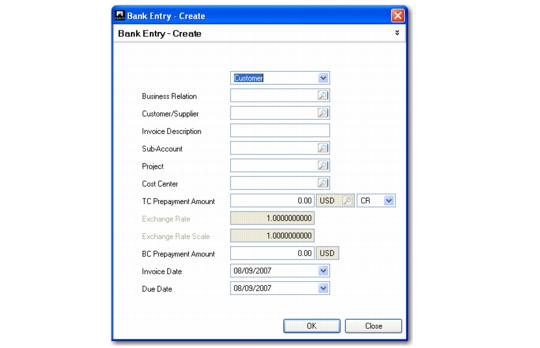
Allocate as a Prepayment
You can create a prepayment for the entry amount instead of allocating to an invoice. The bank movement is registered as a prepayment to or from a customer or supplier. Click the Prepayment button on the Allocate to Invoice screen.
Banking Entry, Prepayment
Field Descriptions
Prepayment Type
Choose from Customer or Supplier.
Business Relation
Specify a business relation for the customer or supplier. If you specify a customer or supplier code initially, the associated business relation is loaded into the field.
Customer/Supplier
Specify the customer or supplier code.
Invoice Description
Enter a brief description (maximum 40 characters) of the prepayment.
Sub-Account/Cost Center/Project
Click to optionally select a cost center, project, or sub-account for analysis on this prepayment.
TC Prepayment Amount
Enter the amount of the prepayment in the transaction currency.
Exchange Rate
This field displays the exchange rate to use to convert between the transaction currency and the base currency prepayment amount. This field defaults to the accounting exchange rate at the invoice date.
Exchange Rate Scale
This field displays the number used in the exchange rate calculation to adjust the amount of the From Currency.
BC Prepayment Amount
This field displays the prepayment amount in base currency, based on the exchange rate applied.
Invoice Date
This field displays the prepayment creation date.
Due Date
This field displays the due date of the prepayment.